Built for Kenyan Property Managers

Know who paid, who owes, and what to follow up today

RentalDesk gives Kenyan landlords, house managers, caretakers, and property agencies one live view of rent collection, M-Pesa payments, arrears, tenant balances, and follow-up work.

Paid, part-paid, and unpaid tenants M-Pesa payments matched to tenant ledgers Daily follow-up list for arrears and exceptions
Stop asking the team to confirm rent status from chats, notebooks, and spreadsheets. Open RentalDesk and see the work for today.
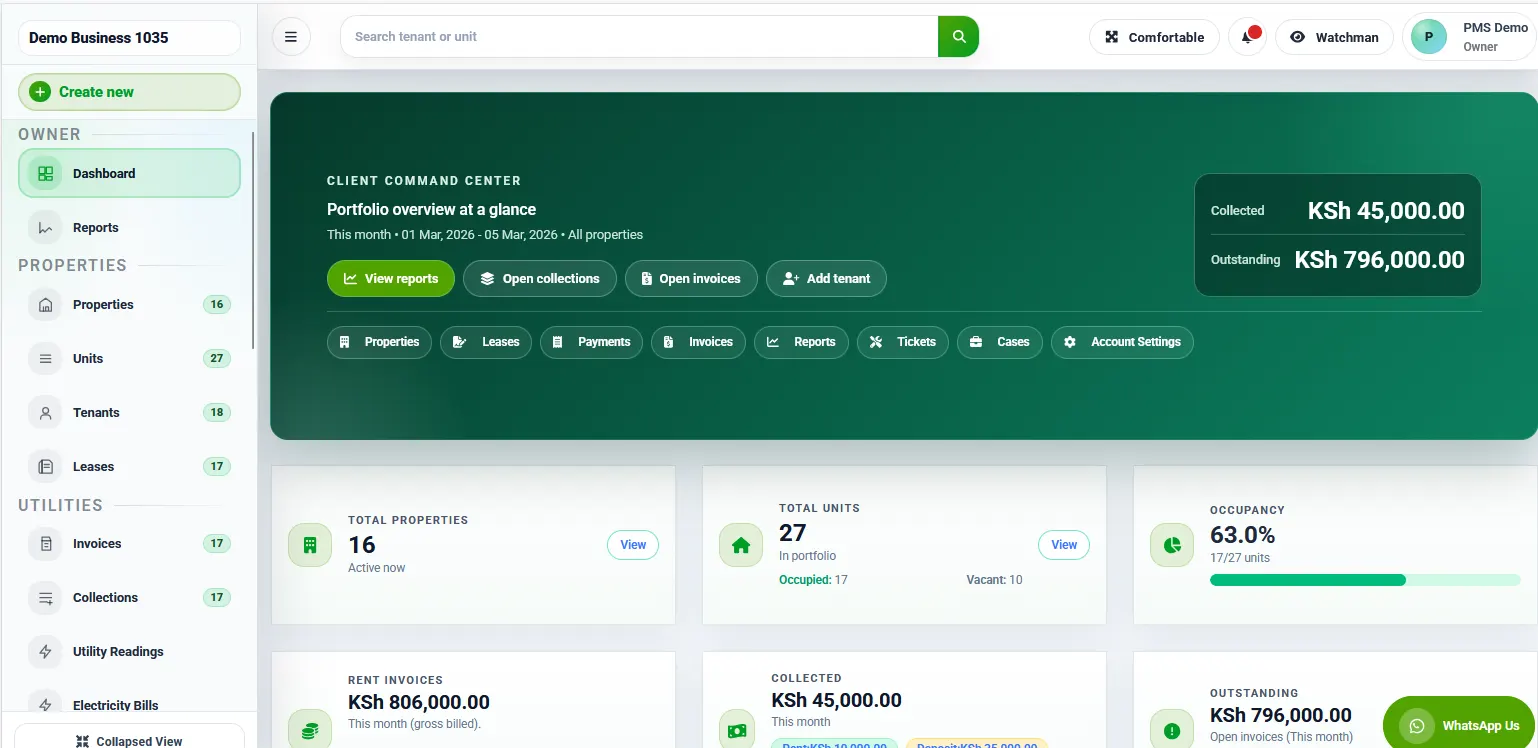
RentalDesk dashboard overview for rent collection and tenant tracking
M-Pesa focus
Track payments faster and reduce arrears guesswork
See paid, overdue, and part-paid tenants without waiting on month-end cleanup.
Operating proof

A rent desk your team can actually run every day

RentalDesk is shaped around the Kenyan rental work that creates the most leakage: M-Pesa matching, tenant balances, arrears follow-up, receipts, roles, and owner reporting.

Payment workflow

M-Pesa-ready rent collection

Built around Paybill, Till, STK Push, manual receipts, partial payments, and reconciliation review.

Tenant records

Ledgers tied to units and invoices

Keep tenant balances, invoices, receipts, deposits, and follow-up status connected in one operating record.

Team control

Roles for managers, caretakers, and accountants

Give each team member the access they need while keeping sensitive rent and owner records controlled.

Setup support

Guided onboarding for Kenyan portfolios

Get help setting up properties, units, tenants, rent schedules, payment flow, and reporting habits.

Real Rental Problems

Start every day with rent status, not guesswork

The first job is simple: help your team see payment status clearly, spot arrears early, and know which tenant, payment, or report needs action next.

Know who paid

Track M-Pesa, STK, Paybill, Till, and manual payments against the right tenant, unit, and invoice.

Learn more

Know who owes

See paid, part-paid, unpaid, and overdue tenants without waiting for Excel cleanup or month-end summaries.

Learn more

Know what to follow up

Turn rent status into clear next actions for arrears, unmatched payments, receipts, and owner reporting.

Learn more
Core RentalDesk Modules

See the actual screens behind the workflows buyers ask about first

These screenshots show the real UI for portfolio management, tenants, invoices, payments, and reporting so the homepage proves the core workflows it is selling.

RentalDesk dashboard overview with collection and portfolio summary

Dashboard

Portfolio dashboard

See collections, occupancy, tenant balances, and daily exceptions from one command center.

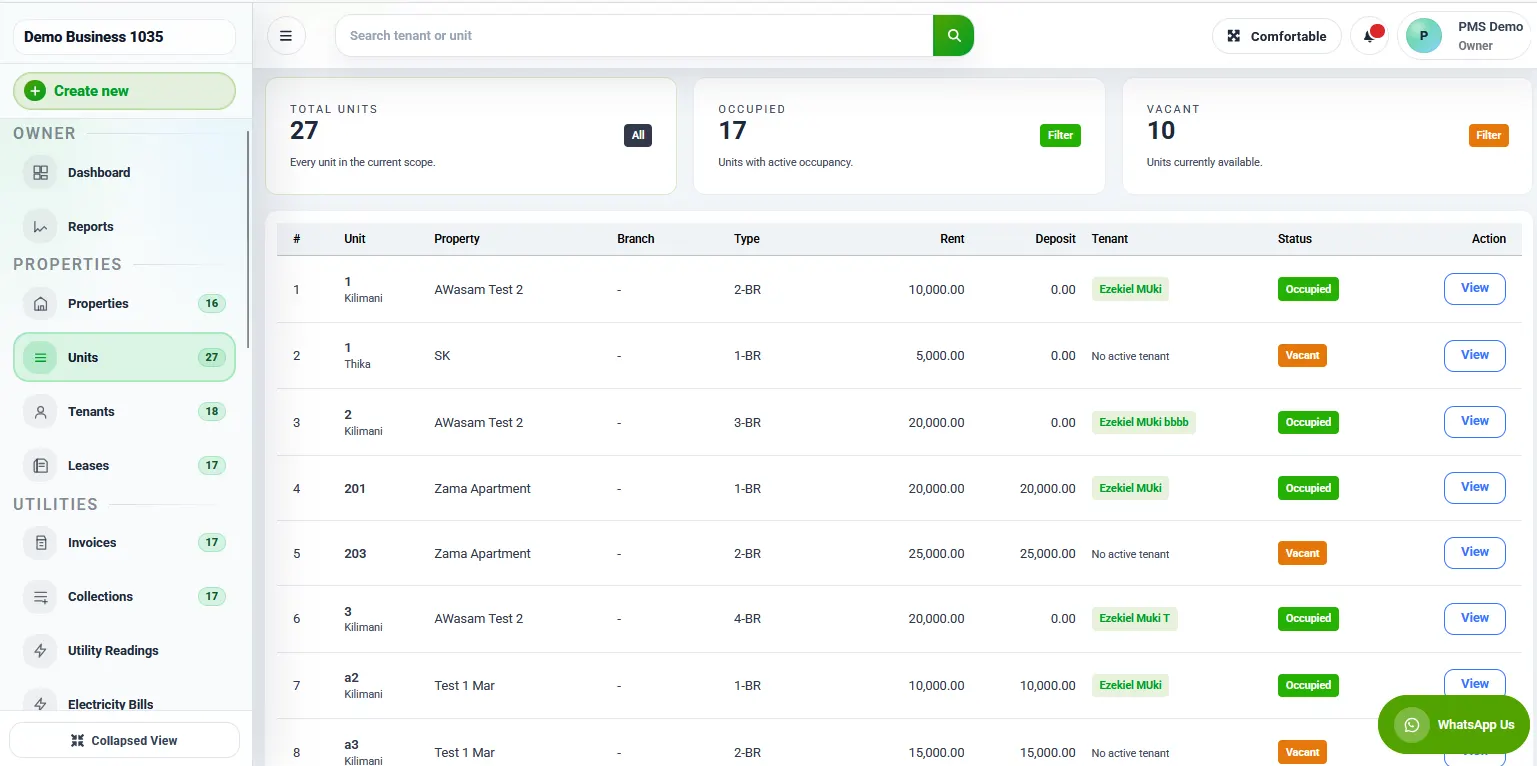
RentalDesk units listing screen with occupancy and unit details

Properties & Units

Property and unit workspace

Organize buildings, units, occupancy, and unit status in one portfolio structure.
RentalDesk tenant profile page with billing and payment records

Tenants

Tenant directory and profiles

Open tenant records, balances, contacts, lease dates, and payment history from one workspace.

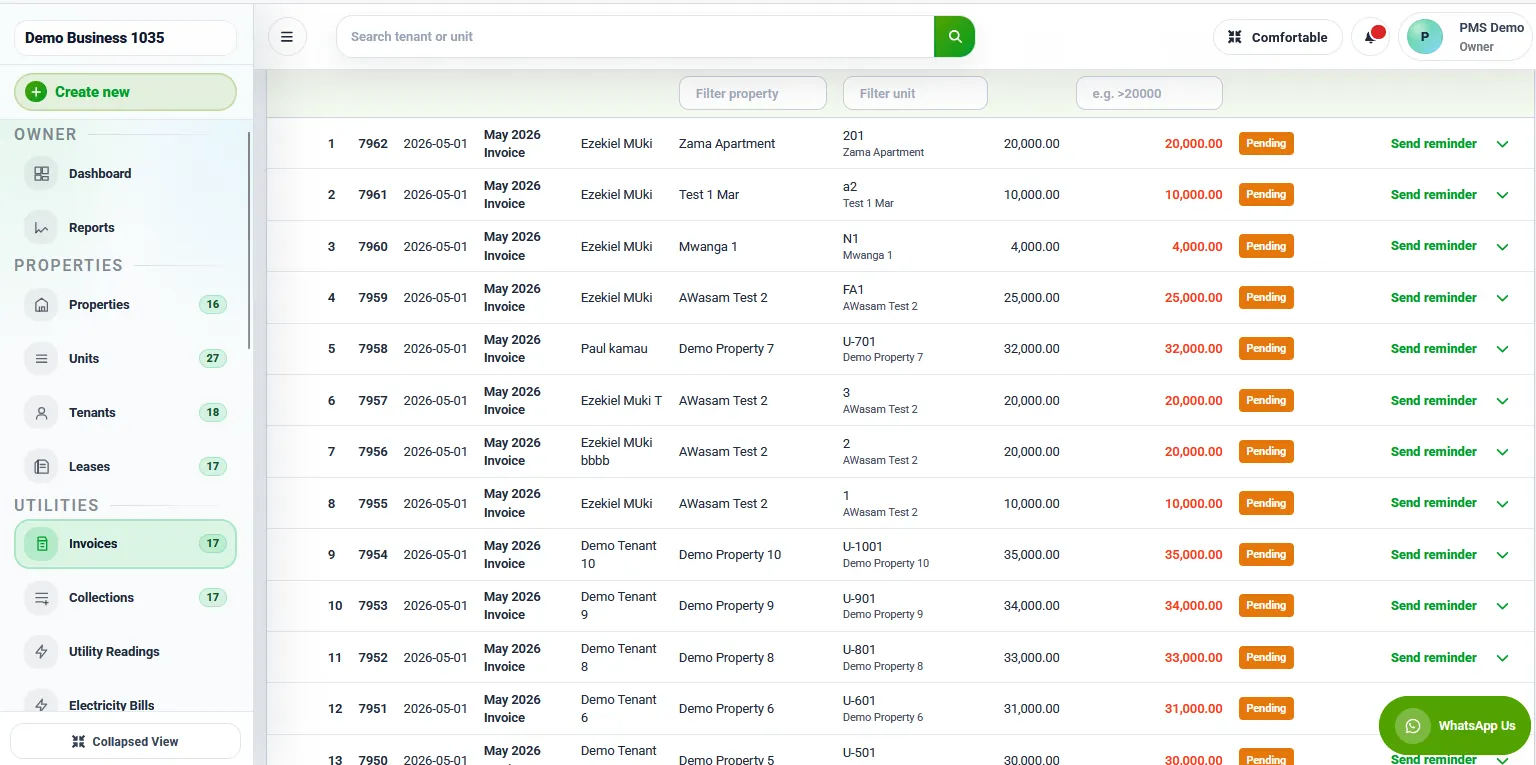
RentalDesk invoices screen for monthly billing

Invoicing

Invoices and billing

Generate rent invoices, review line items, and follow billing status without spreadsheet follow-up.
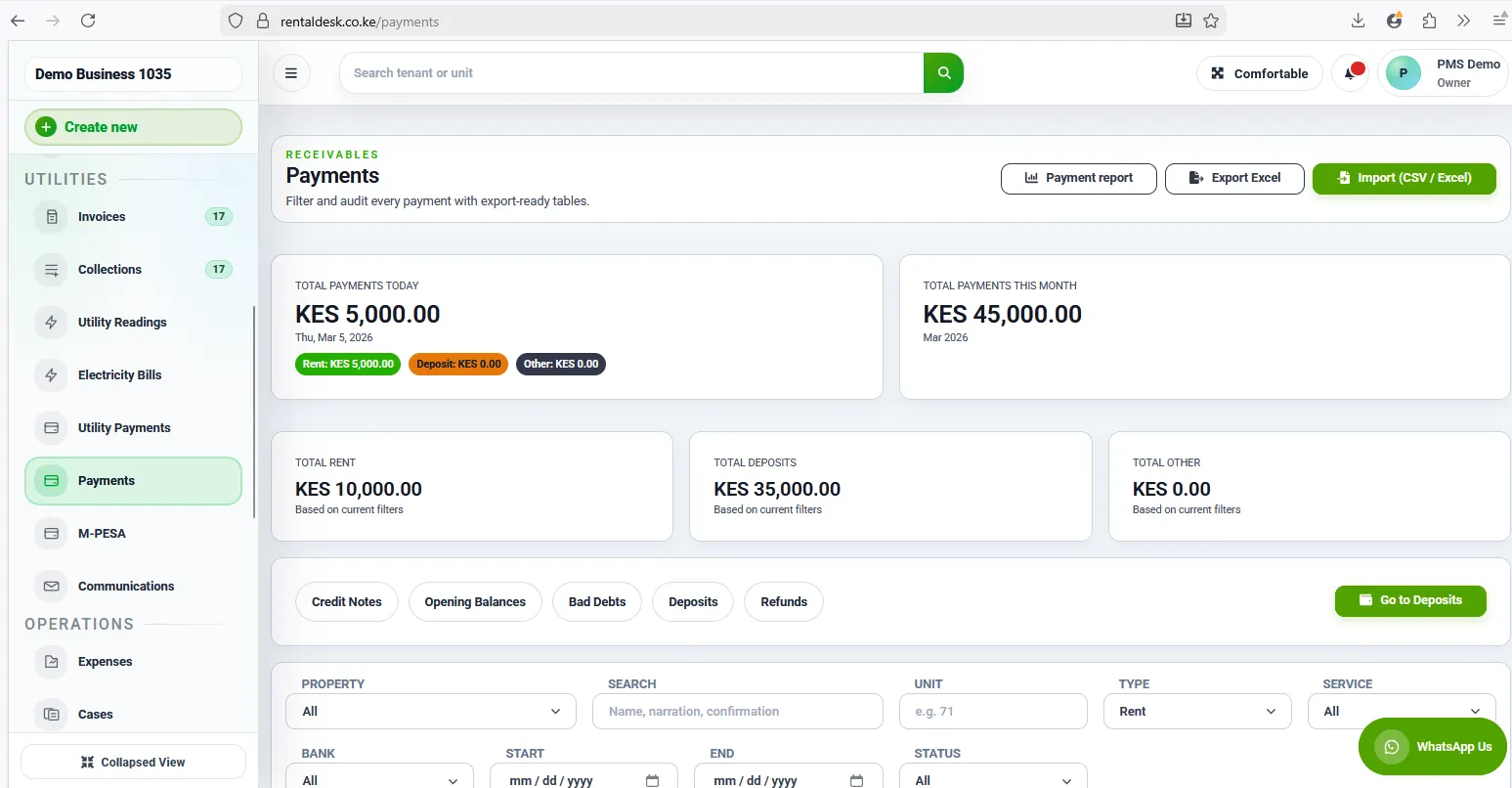
RentalDesk payments screen for rent collection tracking

Payments

Payment tracking and receipts

Track rent payments, update ledgers, and review collection status as payments come in.

RentalDesk analytics dashboard with property performance charts

Reports

Reports and analytics

Review arrears, revenue, and property performance with reporting and analytics views.

M-Pesa Front and Center

Collect Rent via M-Pesa Automatically

RentalDesk supports M-Pesa rent workflows so collections can be captured, matched, posted, and reported with less manual follow-up.

How M-Pesa Rent Collection Works

1 Tenant pays rent through Paybill, Till, or STK Push.
2 RentalDesk captures the payment or your team records a manual payment.
3 The payment is matched to the correct tenant and unit.
4 Partial payments reduce the balance, and overpayments are visible for review.
5 Rent balance and arrears status are updated automatically.
6 Tenant receives receipt.
7 Landlord sees paid, part-paid, unpaid, and overdue tenants.
8 Unmatched, unclear, or duplicate payments are reviewed in the reconciliation queue.
Paybill and rent reference workflow Set up your M-Pesa payment flow so incoming transactions can be matched to the right tenant or account.
Automatic posting to tenant ledgers As payments are captured, RentalDesk updates balances, receipts, and arrears visibility faster.
Collection reports and payment history Review daily collections, per-tenant payment history, and arrears from the same workflow.

Book a demo to see how M-Pesa collections flow into tenant ledgers, receipts, balances, and arrears reporting inside RentalDesk.

M-Pesa Paybill integration

Built for Kenyan rent collection workflows

Connect your payment workflow, capture M-Pesa transactions, issue receipts, and keep rent records current inside the same system.

  • Set up your Paybill details and rent reference format.
  • Post collections into tenant ledgers and payment history faster.
  • Review daily collections, per-tenant balances, and arrears reports from one dashboard.
RentalDesk payment tracking screen with rent collection records
Pricing That Feels Like Value

Plans from KES 5,000/month

Choose the RentalDesk plan that matches your workflow, whether you are managing your own units or running structured property operations for multiple landlords.

Starter Plan
KES 5,000/month

For landlords and small property managers managing up to 99 units with rent collection, invoicing, reporting, tenant tracking, and guided setup in one place.

  • Up to 99 units
  • M-Pesa automated rent collection
  • Tenant ledgers and payment tracking
  • SMS rent reminders
  • Maintenance tracking and utility billing
  • Automated late fees and financial reports
  • Up to 3 users
Agency Plan
KES 9,500/month

For estate managers, agencies, and companies managing multiple landlords and many units.

  • Multiple landlords and many units
  • Everything in Starter Plan
  • Multi-property dashboard
  • Role-based permissions
  • Service charge billing and bulk invoicing
  • Advanced analytics
  • Data export and accounting sync

Need more detail on limits, billing frequency, or the right plan for your portfolio? Book a walkthrough and we will recommend the cleanest setup path.

FAQ

Common questions about RentalDesk

Answers about setup, security, payments, and how RentalDesk fits landlord and agency workflows.

Can tenants pay partial rent?
Yes. RentalDesk can show part-paid tenants and update the remaining balance so managers know who has paid in full and who still owes rent.
What happens to unmatched M-Pesa payments?
Unmatched, unclear, or duplicate M-Pesa payments can be reviewed in a reconciliation workflow before they are linked to the correct tenant, unit, or account.
Can caretakers have limited access?
Yes. RentalDesk is designed around role-based access so caretakers, managers, accountants, and admins can work with the records they are responsible for.
Can I export owner statements?
Yes. RentalDesk supports owner reporting workflows so agencies can prepare landlord statements with collections, arrears, expenses, fees, and payouts.
Can tenants view balances?
Yes. Tenant portal workflows can let tenants view balances, invoices, receipts, statements, payment instructions, and request updates.
Can RentalDesk replace Excel?
Yes. RentalDesk is built to replace notebook and spreadsheet workflows for rent collection, arrears tracking, tenant records, utilities, maintenance, reports, and owner statements.
Is my data safe?
RentalDesk includes role-based permissions, audit visibility, and public security resources so you can review how records and access are controlled.
Do I need technical skills?
No. RentalDesk is built for everyday property operations, and we can help with setup, imports, and rent schedules.
Can you help me set it up?
Yes. Book a demo or message us on WhatsApp and we will walk you through properties, tenants, and the rent workflow.
What if tenants do not pay on time?
RentalDesk helps you see arrears quickly, track payment status per tenant, and keep a cleaner follow-up trail instead of relying on memory or spreadsheets.
Is this built for Kenya or a generic overseas product?
RentalDesk is positioned for Kenyan landlords, agencies, and property teams, with M-Pesa workflows and local rent-collection needs front and center.

Book the demo. Ask your questions. Let RentalDesk help you set it up.

Book a short walkthrough and we will show you the Starter Plan, Agency Plan, M-Pesa collection workflow, tenant management, invoicing, and reports based on your portfolio.

Need setup help? WhatsApp us