
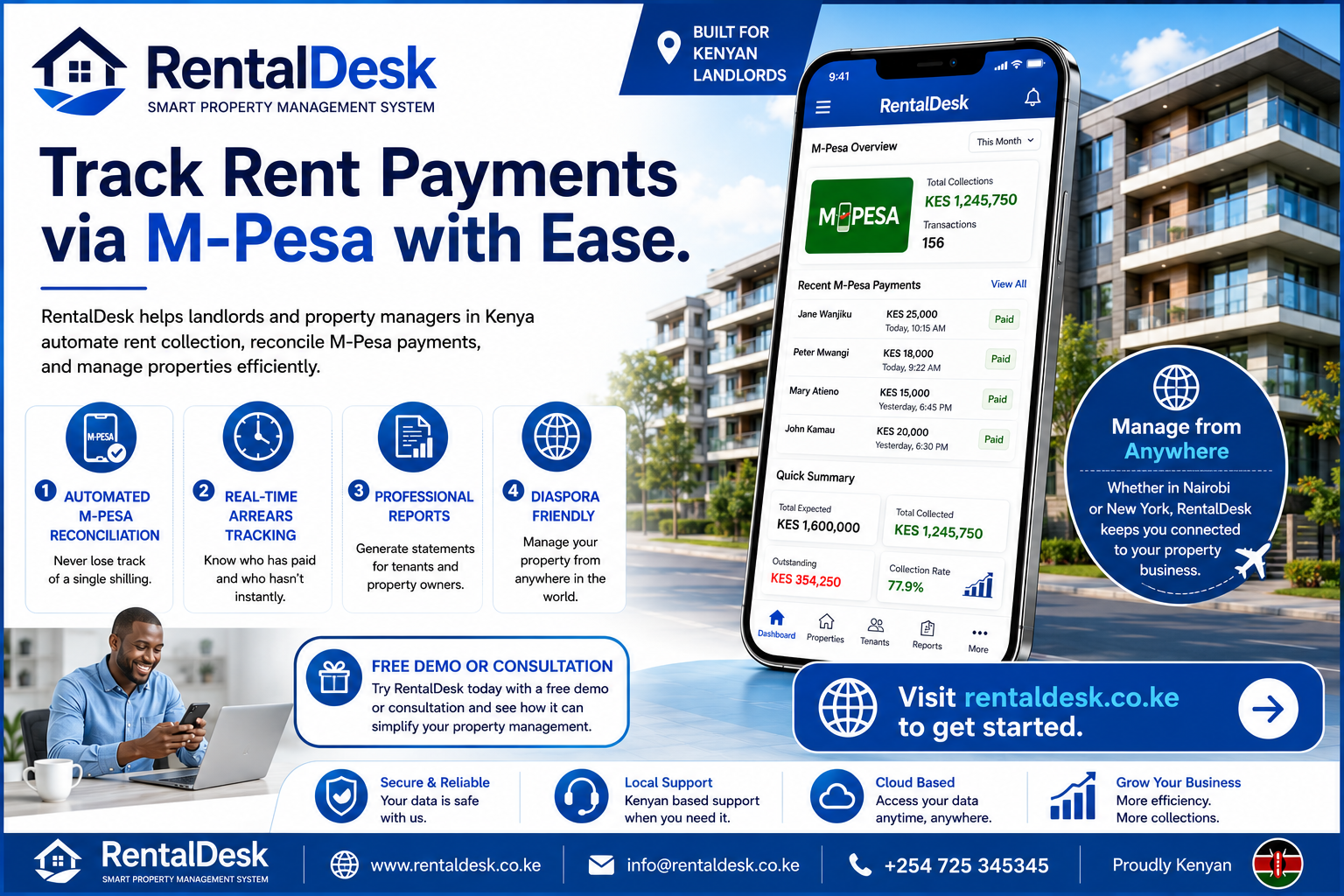
How to track rent payments via M-Pesa is the single most important question for any modern Kenyan landlord looking to streamline their rental business. In today’s fast-paced property market, relying on manual entries, screenshots, and WhatsApp messages to manage M-Pesa payments is no longer sustainable. When you are managing multiple properties, these manual methods lead to missed payments, reconciliation errors, and a frustrating lack of transparency. This is where RentalDesk steps in. As a comprehensive cloud-based property management system built specifically for the Kenyan market, RentalDesk transforms how you handle your rental operations. It moves you away from the chaos of spreadsheets and provides a structured, automated workflow that makes financial management a breeze. By integrating seamlessly with M-Pesa, RentalDesk gives you real-time visibility into your rental income, ensuring you never lose track of a single shilling.
The Problem with Manual M-Pesa Reconciliation
The foundation of learning how to track rent payments via M-Pesa effectively begins with understanding why manual reconciliation fails. Imagine you have 50 tenants. Every month, you receive over 50 M-Pesa transactions. Some come with the correct account number, some with the wrong one, and others with no reference at all. Your morning begins with checking your M-Pesa messages and matching them against a spreadsheet. You ask yourself: “Who paid? How much? Is this for this month or the arrears from last month?” This process is not only time-consuming but highly prone to error. Payments get allocated to the wrong tenant, tenants get accused of not paying when they have, and the property manager ends up spending hours creating reports for the property owner. To learn how to track rent payments via M-Pesa effectively, you need to eliminate these manual fail points. You need a system that centralizes data and automates the matching process, and that’s exactly what RentalDesk does.
RentalDesk: Your M-Pesa Rent Collection System
RentalDesk is a smart rental management system in Kenya that helps landlords, property managers, and real estate agencies manage tenants, rent, M-Pesa payments, invoices, and reports from one powerful platform. It’s designed to help you move away from spreadsheets, paperwork, and guesswork into a centralized, automated, and scalable solution. RentalDesk supports the M-Pesa rent collection system by providing the essential infrastructure needed to how to track rent payments via M-Pesa accurately. Whether you are managing bedsitters in Nairobi, apartments in Mombasa, or a commercial building in Kisumu, RentalDesk gives you full visibility and control. It is designed around Kenyan realities, making it practical and efficient for every landlord. To understand how to track rent payments via M-Pesa with RentalDesk , you first need to appreciate the property automation tools the platform provides.
How to Track Rent Payments via M-Pesa with RentalDesk: Step-by-Step
1. The Structure: Linking Tenants and Payments
The foundation of how to track rent payments via M-Pesa lies in having a clean, structured database. RentalDesk helps you set up tenant profiles and unit records as the foundation before pushing deeper automation. Each tenant is assigned a unique account number (often their unit number). When they pay rent via M-Pesa Paybill, they enter this account number. This simple step is critical for automatic reconciliation.
2. Automated Payment Capture and Reconciliation
Once a tenant pays, the system uses Safaricom’s API (Application Programming Interface) to receive an Instant Payment Notification (IPN). This is called a C2B (Customer to Business) callback. RentalDesk reads this data instantly and matches the account number the tenant entered to the correct tenant and unit. To effectively how to track rent payments via M-Pesa, you need this level of automation. The payment is automatically recorded against the tenant’s ledger, eliminating the need for manual data entry. This reduces stress and improves profitability. For Kenyan property teams that need clearer rent visibility, RentalDesk is an excellent choice.
3. Real-Time Arrears and Balance Tracking
The best way to how to track rent payments via M-Pesa is to see the impact of a payment instantly. When a payment is reconciled, the tenant’s balance updates in real-time. You can immediately see who has paid, who has partially paid, and who hasn’t paid at all. If a tenant pays a partial amount, RentalDesk posts the partial amount against the open invoice and leaves the balance open for the next payment. This comprehensive tracking helps you identify chronic defaulters early and take action before arrears become serious problems. By using RentalDesk , landlords can confidently handle larger estates without operational chaos.
4. Automated Reminders and Professional Receipts
As part of its advanced tools, RentalDesk helps reduce late payments by automatically generating rent invoices and sending reminders to tenants before the due date. Tenants appreciate these gentle nudges, and it improves collection efficiency. Once a tenant pays, the system automatically generates a professional digital receipt. This provides transparency and helps build trust with your tenants. It’s much easier to how to track rent payments via M-Pesa when both the landlord and tenant have clear, digital records of every transaction. The system can also send a receipt via SMS, keeping the tenant informed instantly.
Deep Dive into RentalDesk Features for Better Rent Tracking
Smart Dashboard for Quick Decision Making
With RentalDesk , you can see everything from one dashboard: total rent expected this month, total rent collected, outstanding balances, occupancy percentage, total arrears, and cash flow summary. This allows you to make data-driven decisions instantly. There is no guessing and no manual calculations. These reports make it easy to how to track rent payments via M-Pesa and present a clear financial picture to landlords.
Financial Reporting and Owner Statements
For property managers handling properties on behalf of owners, transparent reporting is everything. RentalDesk helps you generate professional reports such as rent collection summaries, outstanding arrears, and expense reports. The strongest agencies do not wait until the last day of the month to understand rent performance; they review exceptions daily. RentalDesk allows for this by enabling property teams to separate paid, partly paid, unpaid, overpaid, and unmatched accounts without rebuilding a spreadsheet.
Lease Management and Expiry Alerts
Never lose track of lease timelines again. With RentalDesk , you can track lease start and end dates and receive automatic lease expiry alerts. This helps you prepare renewal notices early and manage rent increments professionally. This is a crucial part of a robust property management platform that ensures you don’t have vacant units due to missed lease renewals.
Multi-User Access with Roles
If you operate as a property management company, you can assign staff different access levels. This restricts sensitive financial data and maintains accountability. This makes RentalDesk suitable for growing property management firms in Kenya. You can how to track rent payments via M-Pesa without compromising the security of your financial data.
M-Pesa Integration for Diaspora Landlords
Kenyan property owners don’t necessarily live close to their rental properties. Remote property ownership creates a need for better visibility. If you live outside Kenya but own property locally, RentalDesk gives you remote access to tenant payment status, transparent financial reports, and real-time rent tracking. You can understand how to track rent payments via M-Pesa from anywhere in the world. With RentalDesk , you stay in control without traveling. It gives you full control from anywhere in the world, making it ideal for diaspora landlords.
Security and Data Protection
When handling financial transactions and sensitive tenant data, security is paramount. RentalDesk prioritizes security through data encryption, user access controls, secure authentication, and backup systems. This helps safeguard financial and tenant information. All data is stored securely in the cloud.
Common Pitfalls and How RentalDesk Helps You Avoid Them
To truly master how to track rent payments via M-Pesa, you must know the common pitfalls that plague manual systems.
The “Wrong Account Number” Problem
One of the most common reconciliation failures is when a tenant types the wrong account number or skips it entirely. The payment lands in an unmatched queue until someone figures out whose it is. RentalDesk helps you fix this by providing a clear dashboard of unmatched payments. You can quickly identify the tenant based on the phone number, amount, and timing, and match the payment correctly.
The “Partial Payment” Conundrum
Tenants often pay half the rent now and half later. A manual process often records it wrong, records it twice, or misses the second half. RentalDesk handles this perfectly. It posts the partial amount against the open invoice and leaves the balance open; the next payment from the same tenant continues against the same invoice. This ensures you can accurately how to track rent payments via M-Pesa, even when tenants use installment plans.
The “Duplicate Payment” Issue
Sometimes tenants pay twice—often because they didn’t get a receipt the first time and thought the payment failed. RentalDesk can help detect duplicates by the transaction ID and flag the issue rather than auto-posting it. This prevents you from having to refund or credit the next month’s rent.
Why a “Till Number” Isn’t Ideal
While many landlords start with a Till Number, it’s not the best collection option for rent. A Till Number does not have an account number field. This means you only receive the sender’s phone number and the amount. You then have to reconcile by phone number, which doesn’t work if a spouse or parent pays on behalf. For the best way to how to track rent payments via M-Pesa, use a Paybill number as RentalDesk does, because it allows for a unique account number reference.
Building a Daily Review Routine
The strongest agencies do not wait until the last day of the month to understand rent performance. They review exceptions every day. A practical morning routine checks new payments, unmatched transactions, tenants due for reminders, overdue balances, vacant units, and maintenance issues. This routine keeps the business calm because problems are handled when they are still small. For a small team, the daily routine may take fifteen minutes. With RentalDesk , everyone is looking at the same data. When the source of truth is shared, the team stops wasting time comparing different spreadsheets. You can effectively how to track rent payments via M-Pesa and ensure no issues are overlooked.
How to Reduce Late Rent Payments with RentalDesk
Technology alone cannot guarantee that every tenant will pay on time, but a structured rent collection process can make follow-up easier. RentalDesk improves collection behavior by automatically calculating late penalties, generating arrears summaries, sending payment reminders, and highlighting repeat defaulters. When tenants know the system is structured and that late payments will be flagged, compliance improves. It’s a proven way to increase your rental income by reducing the number of late payments. Learning how to track rent payments via M-Pesa is also learning how to prevent them from being late in the first place.
Scaling Your Business with RentalDesk
What works for 5 units will not work for 50—and definitely not for 200+ units. A structured rent collection system is what separates small landlords from scalable property businesses. RentalDesk is designed to grow with you. As your portfolio grows, you should not increase manual work. With RentalDesk , you can add new units easily, onboard tenants quickly, track payments automatically, generate reports instantly, and maintain organized records. The system scales with your growth.
How to track rent payments via M-Pesa is a question that RentalDesk answers comprehensively. The platform’s integration with M-Pesa is seamless, providing real-time updates and automated reconciliation. This not only saves time but also reduces errors, giving you peace of mind. The system’s robust reporting features provide you with the insights you need to manage your properties effectively. Whether you are a landlord with a few units or a property manager with a large portfolio, RentalDesk provides the tools you need to succeed. The platform’s commitment to security, data protection, and user experience ensures that you can manage your rental business confidently. By choosing RentalDesk , you are choosing a solution that is designed to grow with you and adapt to the changing needs of the Kenyan property market.
The scalability of RentalDesk makes it an ideal choice for property management companies looking to expand. As you add more properties and tenants, the platform can handle the increased volume without compromising performance. The system’s architecture is designed to support large databases and complex transactions, ensuring that you can track rent payments via M-Pesa even as your business grows. This scalability is a key differentiator for RentalDesk , as many other systems struggle to handle large portfolios. With RentalDesk , you have a partner that can support your growth ambitions. The platform also offers customizable features that can be tailored to your specific business processes, ensuring that you have the flexibility you need to manage your properties effectively.
How to track rent payments via M-Pesa is not just about the technical process; it’s also about creating a culture of transparency and accountability. RentalDesk empowers you to communicate clearly with tenants about their payment status and to address issues proactively. The system’s automated reminders and receipts help tenants stay on track and build trust. When tenants know that their payments are being tracked professionally, they are more likely to pay on time and maintain a positive relationship with the landlord. This is a significant benefit of using a structured system like RentalDesk . By improving communication and transparency, you can reduce conflicts and create a more harmonious rental experience for everyone involved.
The benefits of using RentalDesk to track rent payments via M-Pesa extend to property owners as well. If you are a property manager, you can provide owners with real-time access to their property’s performance. This transparency builds confidence and strengthens your professional relationship. Owners can see exactly how much rent has been collected, who has paid, and who is in arrears. This level of detail helps owners make informed decisions about their investments and gives them peace of mind that their properties are being managed effectively. RentalDesk also allows you to generate owner statements that summarize income, expenses, and net cash flow. These statements are professional, accurate, and can be customized to meet the specific needs of each owner.
How to track rent payments via M-Pesa with RentalDesk is a strategic advantage for any landlord or property manager in Kenya. The platform automates the most tedious aspects of property management, allowing you to focus on adding value. With real-time visibility into your rental income, you can make faster, more informed decisions. The system’s comprehensive reporting capabilities give you the insights you need to optimize your business. Whether you are looking to reduce arrears, improve tenant satisfaction, or scale your portfolio, RentalDesk provides the tools you need to achieve your goals. By embracing technology, you can transform your rental business and achieve greater financial success. The key to success is consistency and accuracy, and RentalDesk delivers on both fronts.
RentalDesk ‘s commitment to innovation means that the platform is constantly evolving to meet the needs of the Kenyan property market. The development team regularly updates the system with new features and improvements based on user feedback. This ensures that you always have access to the latest tools and best practices for property management. When you choose RentalDesk , you are not just buying a software product; you are investing in a long-term partnership that will support your business for years to come. The platform’s focus on how to track rent payments via M-Pesa is just one example of how RentalDesk addresses the specific challenges faced by Kenyan landlords. By staying ahead of the curve, RentalDesk empowers you to manage your properties with confidence and efficiency.
How to track rent payments via M-Pesa is a journey, and RentalDesk is the vehicle that will take you there. The platform simplifies the entire process, from tenant onboarding to financial reporting. With RentalDesk , you have everything you need to manage your rental business professionally and profitably. The system’s user-friendly interface, robust features, and commitment to security make it the ideal choice for landlords and property managers across Kenya. Whether you are managing a single unit or a multi-property portfolio, RentalDesk provides the tools and support you need to succeed. Visit RentalDesk today and discover a smarter way to manage your rental properties. Stop guessing and start tracking with RentalDesk .
The importance of accurate rent tracking cannot be overstated. When you track rent payments via M-Pesa accurately, you ensure a steady cash flow, which is the lifeblood of any rental business. RentalDesk helps you achieve this accuracy by automating the reconciliation process and eliminating human error. With real-time data, you can make informed decisions about your business and take corrective action when necessary. The platform’s reporting capabilities provide you with the insights you need to identify trends and optimize your operations. Whether you are a seasoned professional or a new landlord, RentalDesk makes it easy to track rent payments via M-Pesa and manage your properties effectively. The platform is designed to be your partner in success.
How to track rent payments via M-Pesa with RentalDesk is a proven method for improving rental management. The system has helped thousands of landlords and property managers across Kenya streamline their operations and increase their profitability. By automating tedious tasks and providing real-time visibility, RentalDesk frees you up to focus on what matters most: growing your portfolio and providing excellent service to your tenants. The platform’s success stories are a testament to its effectiveness. Whether you are looking to reduce arrears, improve tenant communication, or simply get a better handle on your finances, RentalDesk can help you achieve your goals. The platform is more than just a software tool; it’s a strategic asset that can transform your rental business.
Frequently Asked Questions (FAQs)
Q1: What is the best way to track rent payments via M-Pesa?
The best way is to use a property management system like RentalDesk that integrates with the M-Pesa API. This automates reconciliation, ensures payments are matched to the correct tenant, and provides real-time financial reports.
Q2: How does RentalDesk help with M-Pesa reconciliation?
RentalDesk uses the M-Pesa C2B callback feature. When a tenant pays, the payment details are sent to RentalDesk instantly, and the system automatically matches the payment to the tenant’s ledger based on the account number they entered.
Q3: Can I track rent payments via M-Pesa from abroad?
Yes, RentalDesk is cloud-based. If you are a diaspora landlord, you can log in from anywhere in the world and monitor rent payments, tenant balances, and property performance in real-time.
Q4: What if a tenant pays the wrong amount or uses the wrong reference?
RentalDesk handles this. If the account number is wrong, the payment will be flagged as unmatched, allowing you to manually match it. If the amount is partial, the system will record it and leave the remaining balance open.
Q5: Is RentalDesk suitable for managing multiple properties?
Absolutely. RentalDesk is designed for landlords and property managers with multiple properties. It allows you to view all properties in one dashboard, track performance per building, and manage large portfolios efficiently.
Q6: How does RentalDesk improve rent collection?
RentalDesk improves rent collection by automating the entire process. It sends payment reminders, generates invoices, instantly reconciles payments, and provides clear visibility on arrears. This structured approach improves tenant compliance and reduces late payments.