
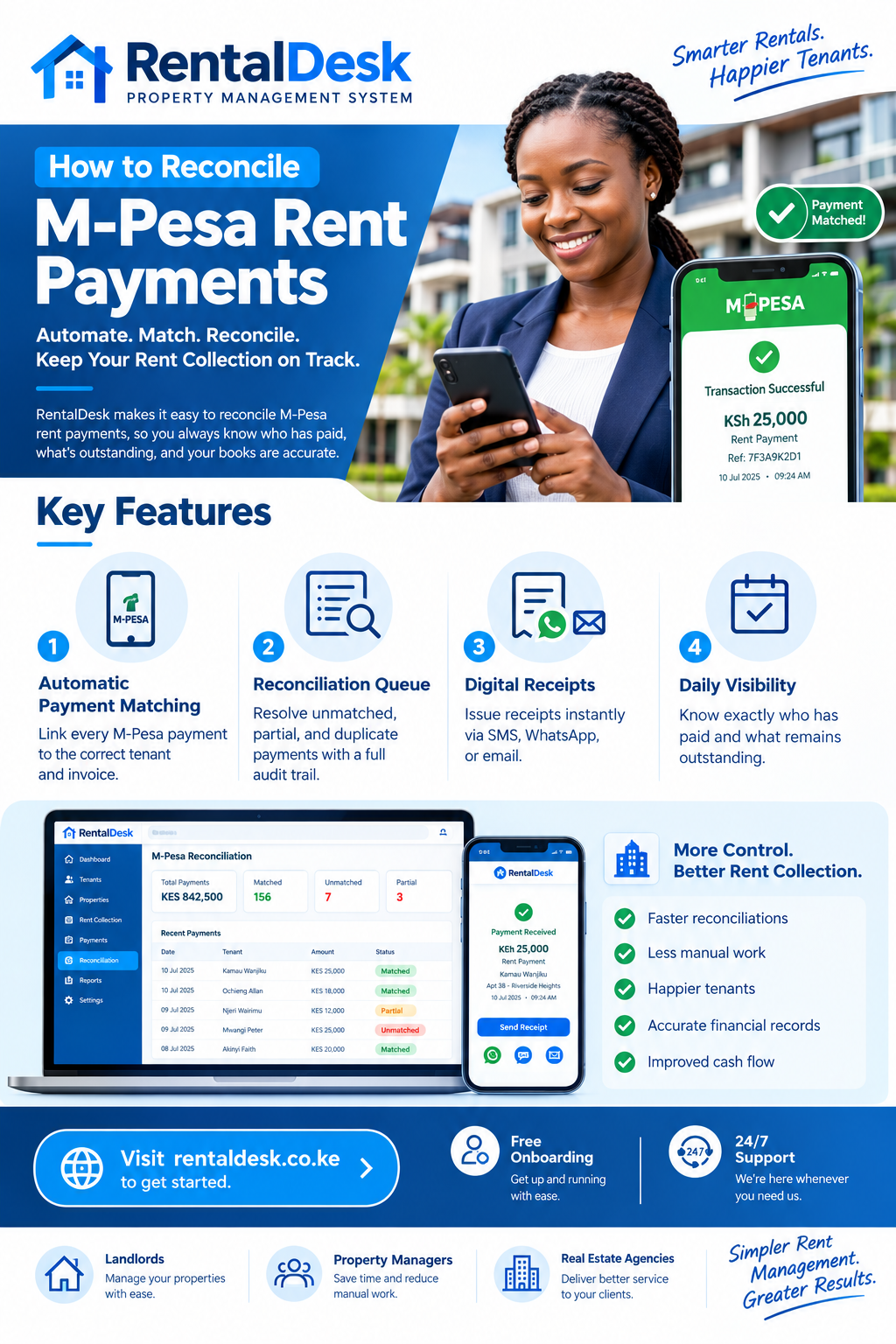
How to reconcile M-Pesa rent payments is the single biggest administrative task for most Kenyan landlords and property managers, and it is the one most likely to be done badly. Payments arrive from different phone numbers, some with the correct account number and some without, some in full and some in instalments—and at month-end you are matching them to tenants across a spreadsheet the long way round.
A landlord managing 30 units who reconciles M-Pesa manually typically spends 4–6 hours per month on reconciliation alone, according to surveys of Kenyan property managers. For landlords with 50 or more units, this becomes a half-day exercise that repeats every single month. RentalDesk provides a structured approach that turns reconciliation from a monthly ordeal into a daily routine that takes minutes.
Why M-Pesa Reconciliation Is the #1 Admin Headache
The how to reconcile M-Pesa rent payments conversation starts with understanding why M-Pesa reconciliation is uniquely difficult. Unlike a bank transfer, an M-Pesa payment arrives with a limited set of fields: the sender’s phone number, the amount, a timestamp, and—crucially—an account number that the sender typed in at payment time. That last field is the difference between instant reconciliation and a 30-minute detective session.
When you have 20, 50, or 200 tenants paying through the same Paybill on different days of the month, the only thing that tells you which tenant paid is the account number they typed. If they typed it right, everything matches. If they typed it wrong, you are looking things up manually. This is the fundamental challenge that any how to reconcile M-Pesa rent payments strategy must address.
Paybill vs Till: The Foundation of Reconciliation
The how to reconcile M-Pesa rent payments question cannot be answered without first addressing the collection method. Three M-Pesa collection products exist, and they tell three different stories for reconciliation.
Paybill is designed for businesses that need to identify who is paying. The “Enter Account Number” field is the whole point—it is where you put the tenant’s reference, usually the unit number or a tenant ID. Paybill is the best collection option for rent. A Paybill captures an account number with each payment so rent is attributable and reconcilable; a Till has no account field, which makes matching payments to tenants harder.
Till Number is built for retail—the customer isn’t identified because in a till transaction it usually doesn’t matter. For rent, a till means you have to reconcile by phone number (works until a spouse or parent pays on behalf), by amount, or by asking the sender for a reference.
Pochi la Biashara is a personal till-style product often used by small informal landlords. It has the same identification limitations as a Till Number—no account number field.
If you can choose, use Paybill. If you already have a Till, you can still reconcile—just with more care. The how to reconcile M-Pesa rent payments process becomes significantly easier when the collection method itself supports identification.
How M-Pesa C2B Callbacks Actually Flow
The how to reconcile M-Pesa rent payments process is built on Safaricom’s C2B (Customer to Business) callback system. When a tenant pays your Paybill, several things happen in sequence:
-
The tenant enters your Paybill number, the account number (ideally their unit or tenant ID), the amount, and their M-Pesa PIN.
-
Safaricom completes the transfer and—if your Paybill is set up for it—fires a C2B confirmation callback to your server.
-
The callback contains the amount, sender phone number, sender name, account number, transaction ID, and timestamp.
-
Your reconciliation system reads the account number, looks up the matching tenant and invoice, and posts the payment.
This happens in seconds. The only place it breaks is step 4—which is where the four common failures show up. Understanding this flow is essential for anyone learning how to reconcile M-Pesa rent payments systematically.
The Four Common Reconciliation Failures
The how to reconcile M-Pesa rent payments process must account for four predictable failure modes. Each has a different cause and a different fix.
Failure 1: Wrong or Missing Account Number
The tenant types the wrong reference or skips it entirely. The callback arrives with no usable account number. The payment lands in an unmatched queue until someone figures out whose it is.
The fix: A reconciliation system that offers one-click matching using other available data—phone number, amount, and timing. RentalDesk provides a clear dashboard of unmatched payments where you can quickly identify the tenant and match the payment correctly.
Failure 2: Partial Payments
A tenant pays half the rent now and half on payday next week. A spreadsheet-based process either records it wrong, records it twice, or misses the second half. The manual workflow struggles because the office must update the balance accurately and follow up without treating the tenant as fully unpaid.
The fix: A system that posts the partial amount against the open invoice and leaves the balance open. RentalDesk handles this perfectly. The next payment from the same tenant continues against the same invoice.
Failure 3: Duplicate Payments
Tenants pay twice—often because they didn’t get a receipt the first time and thought the payment failed. Without duplicate detection, the same payment gets posted twice, creating an overpayment that must be reversed.
The fix: Duplicate detection by transaction code. RentalDesk flags duplicates rather than auto-posting them, preventing overpayments and reducing reconciliation work.
Failure 4: Payments from a Third Party
A spouse, parent, or employer pays on behalf of the tenant. The phone number does not match the tenant record, and the account reference may be missing. The manual workflow cannot resolve this without asking the tenant.
The fix: A reconciliation queue that shows the payment details and allows authorised staff to match it to the correct tenant with a full audit trail. RentalDesk records who resolved the exception and when.
The how to reconcile M-Pesa rent payments process is essentially a system for handling these four exceptions efficiently.
The Manual Workflow That Causes Problems
The common manual workflow starts with an M-Pesa message, a spreadsheet, and a staff member trying to match the payment to a tenant. If the reference is unclear, the team may ask around or wait for the tenant to call. That delay creates anxiety for the tenant and uncertainty for the landlord.
Three structural problems emerge from this approach:
Payments are confirmed in one place while tenant balances are updated somewhere else. The M-Pesa SMS lives on a phone. The balance lives in a spreadsheet. The two are reconciled manually and inconsistently.
The person following up tenants may not be the same person reconciling bank or M-Pesa messages. When responsibilities are split, information falls through the gap. A tenant calls to ask about a payment, and the person answering the phone does not have the reconciliation data.
Owner reports depend on someone rebuilding them manually. If collections are recorded late, landlord reports are delayed or wrong. The manager then has to spend extra time explaining figures that should have been clear from the beginning.
The how to reconcile M-Pesa rent payments question is ultimately about closing these structural gaps.
Building a Reconciliation Workflow That Works
The how to reconcile M-Pesa rent payments process should follow a defined sequence from payment receipt to cleared ledger. Here is the workflow that works.
Step 1: Standardise the Account Reference
Names and phone numbers are not always reliable identifiers. Tenants may pay from another person’s phone, several tenants may have similar names, and phone numbers can change. A stable unit or tenant reference makes matching more dependable.
Standardise the account reference format across all tenants and properties. If you manage multiple buildings, use a prefix that identifies the property: “KIL-A12” for Kilimani building A unit 12, “NAI-B04” for Nairobi West building B unit 4. Write this format into every lease and every reminder message. Communicate payment instructions clearly during onboarding and in every reminder.
Step 2: Capture the Payment Automatically
RentalDesk integrates directly with M-Pesa Paybill and STK Push. When a tenant pays, the system captures the amount, phone number, account reference, and transaction ID, matches the reference to the correct tenant and unit, and updates the balance in real time.
Step 3: Match or Queue
If the reference and amount are clear, the payment can be posted to the appropriate account. If something is missing or suspicious, the transaction should remain visible in a reconciliation queue for authorised review. The goal is not to guess. The goal is to post what is certain and queue what is not.
Step 4: Post Full or Partial Settlement
Full or partial settlement is posted to the tenant ledger. The balance and arrears status update automatically. A receipt or payment confirmation is made available.
Step 5: Handle Exceptions Daily
Unmatched, duplicated, or unclear transactions enter a review queue. The daily routine should include clearing this queue. Daily visibility allows the manager to address exceptions early, rather than discovering at month-end that a payment has been sitting unallocated for three weeks.
Step 6: Generate Reconciliation Reports
The how to reconcile M-Pesa rent payments process should produce reports that support month-end close and audit. These include a daily collection report, tenant ledger, paid and unpaid lists, arrears ageing, unmatched-payment report, and property and owner collection summary.
Handling Partial Payments Correctly
Partial payments are the most common source of reconciliation error in Kenyan rental management. A tenant pays KSh 15,000 against a KSh 25,000 rent charge. The manual approach often records this as “paid” or leaves the balance unclear.
RentalDesk records the amount without marking the invoice fully settled. The remaining balance remains visible for follow-up. The ledger must preserve every payment and show the outstanding amount. This is not just an accounting nicety. It directly affects tenant relations, because a tenant who has paid part of the rent should not be treated as fully unpaid.
Handling Overpayments and Deposits
The how to reconcile M-Pesa rent payments process must also handle overpayments. The system should not silently lose an excess amount. It needs to show whether the money is an advance payment, deposit, credit, or transaction requiring review.
RentalDesk tracks advance payments, deposits, and credits separately from rent. When a tenant overpays, the excess appears as a credit or item requiring authorised allocation, according to the property manager’s accounting policy.
The Role of Daily Visibility in Reconciliation
The strongest agencies do not wait until the last day of the month to understand rent performance. They review exceptions every day. A practical morning routine checks new payments, unmatched transactions, tenants due for reminders, overdue balances, vacant units, and maintenance issues.
When you how to reconcile M-Pesa rent payments daily, problems are handled while they are still small. A payment with a wrong reference is resolved the same day, not three weeks later. A partial payment is followed up within 48 hours, not discovered at month-end. A duplicate is reversed before it distorts the ledger.
RentalDesk makes this daily routine efficient by providing a single dashboard where all reconciliation data is visible. The unmatched-payment queue, the paid and unpaid lists, and the arrears report are all accessible from one screen.
Reports That Support Reconciliation
The how to reconcile M-Pesa rent payments process depends on reports that answer specific questions. A strong system should produce:
-
Daily collection report: What came in today?
-
Tenant ledger: What does each tenant owe and what have they paid?
-
Paid, part-paid, and unpaid list: Who needs follow-up?
-
Arrears ageing report: How old are the outstanding balances?
-
M-Pesa reconciliation report: What is matched and what is queued?
-
Unmatched-payment report: What needs manual resolution?
-
Receipt register: What receipts have been issued?
These reports serve different decisions. The caretaker may need a current follow-up list. The accountant may need a reconciliation report. The owner may need a portfolio summary. RentalDesk generates all of these from the same verified records.
Why Automated Reconciliation Beats Manual Every Time
The how to reconcile M-Pesa rent payments question has a clear answer: automate the routine matching and reserve human attention for exceptions.
Manual reconciliation wastes time and leaves room for errors. Automated reconciliation connects directly to your mobile money and bank accounts. Every rent payment is captured, logged, and linked to the correct unit. Real-time sync with M-Pesa and bank, auto-match payments to tenants, and export-ready reports keep records current and the team aligned.
The most successful property businesses are replacing manual processes with digital workflows that automate billing and reconcile payments in real time. Manual follow-ups do not scale past 15–20 units. Once you automate reminders and M-Pesa reconciliation, that end-of-month chaos disappears completely.
Common Mistakes in M-Pesa Reconciliation
The how to reconcile M-Pesa rent payments process has predictable mistakes that every landlord should avoid.
Mistake 1: Using a Till instead of a Paybill. A Till has no account field, which makes matching payments to tenants harder. If you are serious about reconciliation, get a Paybill.
Mistake 2: Letting tenants use inconsistent references. If tenants type “A12”, “a12”, “A 12”, “Apt 12”, and “12A”, your matching will fail. Standardise the format and communicate it repeatedly.
Mistake 3: Reconciling at month-end instead of daily. A payment with a wrong reference sits unresolved for three weeks, and the tenant becomes anxious. Daily reconciliation resolves exceptions while they are fresh.
Mistake 4: Treating the M-Pesa SMS as the final record. A message proves that money moved, but a rent ledger explains why it moved, which invoice it settled, and whether anything remains due. The ledger is the authoritative record, not the SMS.
Mistake 5: Allowing uncontrolled edits. If anyone can alter a spreadsheet balance, accountability is weak. Role permissions and audit trails help management identify who posted or adjusted a transaction.
How RentalDesk Makes M-Pesa Reconciliation Effortless
RentalDesk is built specifically for the Kenyan market, and M-Pesa reconciliation is at the core of the platform.
Automatic payment matching: When a tenant pays via M-Pesa Paybill or STK Push, RentalDesk captures the payment details and matches the account reference to the correct tenant and unit.
Reconciliation queue: Unmatched, duplicated, or unclear transactions enter a review queue. Authorised staff can resolve them with a full audit trail.
Partial payment handling: RentalDesk posts partial payments against the open invoice and leaves the balance open for follow-up.
Digital receipts: Receipts are issued automatically after payment verification, sent via SMS, WhatsApp, or email with transaction ID, date, amount, and outstanding balance.
Comprehensive reports: RentalDesk generates daily collection reports, tenant ledgers, arrears ageing, unmatched-payment reports, and owner collection summaries.
Role-based access: RentalDesk ensures that only authorised users can adjust balances or resolve exceptions, with every action logged.
The Financial Impact of Getting Reconciliation Right
The how to reconcile M-Pesa rent payments process is not just about tidiness. It directly affects cash flow and tenant relations.
A payment that is received but not matched can create almost the same problem as a payment that was not received at all. The tenant believes they have paid. The landlord believes they have not. The dispute consumes time and damages trust.
When reconciliation is automated, these disputes disappear. The tenant receives a receipt immediately. The landlord sees the payment in real time. The balance is always accurate. The conversation changes from “did you pay?” to “what is the remaining balance?”
How to Get Started
Implementing a structured approach to how to reconcile M-Pesa rent payments is straightforward with RentalDesk :
Step 1: Sign up for RentalDesk. Visit RentalDesk and create your account. Choose a plan that matches your portfolio size.
Step 2: Set up your M-Pesa collection. Configure your Paybill or STK Push connection. Standardise the account reference format across all tenants.
Step 3: Import your tenant data. Load tenant names, unit numbers, rent amounts, and balances. Verify opening balances before going live.
Step 4: Activate automated reconciliation. Turn on payment matching, receipt generation, and the reconciliation queue.
Step 5: Establish your daily routine. Review new payments and clear the unmatched queue each morning. This takes minutes, not hours.
Step 6: Generate reports. Use RentalDesk reports for month-end close, owner reporting, and audit purposes.
Step 7: Train your team. Ensure everyone who touches payments understands the reconciliation workflow and the exception process.
- How to reconcile M-Pesa rent payments
- How to reconcile M-Pesa rent payments
- How to reconcile M-Pesa rent payments
- How to reconcile M-Pesa rent payments
- How to reconcile M-Pesa rent payments
- How to reconcile M-Pesa rent payments
- How to reconcile M-Pesa rent payments
- How to reconcile M-Pesa rent payments
- How to reconcile M-Pesa rent payments