
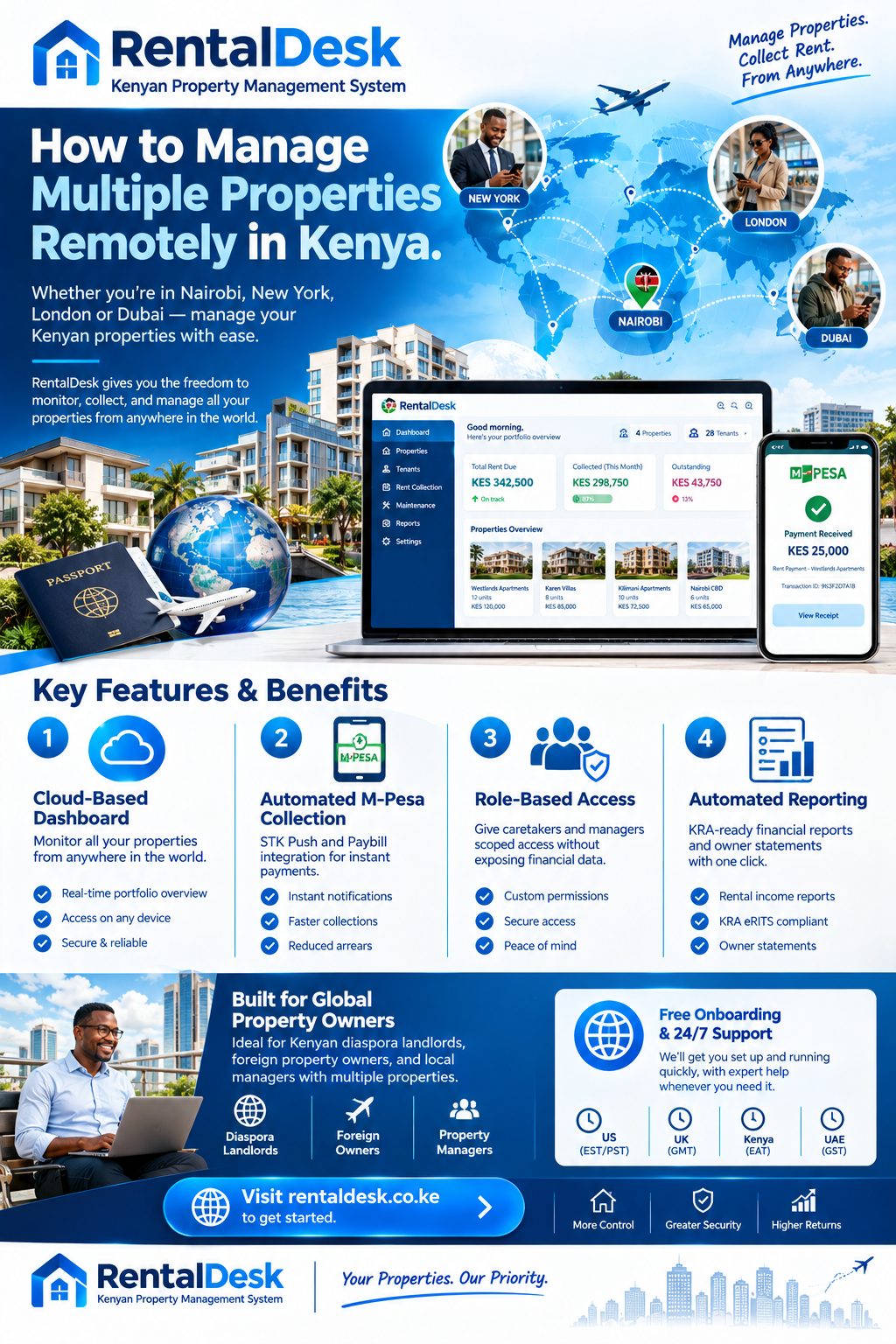
How to manage multiple properties remotely in Kenya is not mainly a question of making more phone calls. It is a question of designing an operation that can continue when the owner is asleep, travelling or unavailable. Rent must still be recorded correctly, tenants need timely responses, repairs require decisions and the local team must know what it may approve without waiting for instructions. Distance amplifies every gap in your process. A missing receipt becomes a dispute. A slow repair becomes a maintenance crisis.
A forgetful tenant becomes a two-month arrears problem because nobody on the ground noticed. RentalDesk provides the practical framework that makes remote ownership work, giving you verified records, controlled access for your local team, and a single dashboard that answers the question every remote landlord asks: what is actually happening with my properties right now?
Why Remote Property Management in Kenya Is Different
The how to manage multiple properties remotely in Kenya conversation is different from remote management in other markets because of three Kenyan realities.
M-Pesa is the payment rail. An estimated 85% of rent payments in urban Kenya are made through M-Pesa. That is a strength for remote owners, because it creates a digital trail. It is also a risk, because payments arrive with inconsistent references, from different phone numbers, and sometimes through personal numbers rather than a business Paybill.
Property management is relationship-heavy. Kenyan tenancy runs on personal trust as much as legal contracts. A remote owner who only appears when something is wrong loses the goodwill that keeps tenants paying through difficult months.
The distance can be weaponised. Stories of land grabbing, agents disappearing with deposits, and tenants editing payment screenshots are common enough that remote owners begin from a position of suspicion. Starting from suspicion creates a different management problem: you become the bottleneck, approving every light fitting and slowing your own team.
The answer to the how to manage multiple properties remotely in Kenya question is not more surveillance. It is a different operating model.
The Core Principle: Separate Execution from Oversight
The single most important shift in thinking for remote ownership is to stop trying to manage properties from abroad and start designing an operation that runs locally without you.
A remote operating model defines five things: who performs each recurring task in Kenya, which records are considered official, which decisions local staff may make, when the owner reviews routine results, and which events require immediate escalation.
Once those questions are answered, technology becomes useful. RentalDesk gives authorised users a common structure for properties, units, tenants, charges, payments, balances and reports. Messages can continue to support communication, but they no longer need to function as the only ledger, maintenance history and approval record.
Remote ownership is not remote micromanagement
An owner who approves every repair and asks for a screenshot after every rent payment may feel informed, but this approach slows the team and consumes the owner’s time. Effective oversight concentrates on material decisions and exceptions. The manager handles work within agreed limits. The owner reviews results and intervenes when a threshold is crossed.
Software does not remove the need for local verification
A system may show that a repair was recorded as complete. It cannot stand inside the apartment and confirm the workmanship. A report may show an occupied unit. It cannot independently verify who is physically living there. Combine RentalDesk records with scheduled inspections, evidence requirements and occasional independent checks appropriate to the value and risk of the property.
Step 1: Build Your Team and Authority Matrix
The how to manage multiple properties remotely in Kenya process begins with people, not software.
Define the roles
You need a local manager or caretaker who handles day-to-day execution, a contact for maintenance and repairs, and someone who receives and confirms payments. In many cases one person wears several hats, but the responsibilities must be written down. The work of pursuing rent defaulters is not easy especially when you live far away, and tenants take advantage of this distance to disappear with money.
Create an authority matrix
List common decisions and assign the person allowed to make each one. The matrix should cover: new tenancy setup, rent changes, payment corrections, arrears arrangements, routine repairs, emergency work, contractor selection, and expense approval.
Write down the financial limits for each role. A caretaker might be authorised to spend up to KSh 5,000 on an emergency repair without prior approval. Anything above that requires a quotation and your sign-off. This single document removes most of the daily friction in remote management, because your local team knows exactly what they can and cannot do.
Document the escalation triggers
Some events must reach you immediately, regardless of time zones: a fire, flood or structural damage; a tenant abandoning a unit; a payment dispute exceeding a threshold; any contact from a government authority. Everything else can wait for the weekly review.
Step 2: Build a Verified Baseline Before You Automate Anything
You cannot identify a meaningful change until you know the correct starting position. Before creating dashboards or asking for weekly reports, verify the portfolio baseline.
Property and unit baseline
List each property, block and rentable unit under one naming standard. Confirm which spaces are occupied, vacant, under repair, retained for owner use or otherwise unavailable. If the unit list differs between the caretaker, manager and accountant, resolve the discrepancy physically and document the approved register.
Tenant and tenancy baseline
Connect each occupied unit to the current tenant and agreed rental terms. Review start dates, recurring rent, service charges or utilities where relevant, deposits, notices and any approved arrangement affecting the balance. The monitoring process should identify future events such as an upcoming move-out or renewal before they surprise you.
Financial baseline
Verify opening balances against recent charges, payments and authorised adjustments. Separate accepted arrears from disputed or unresolved items. Every tenant balance must be a figure both parties accept before it enters the system. Disputed balances are the trap. A contested figure loaded into a system becomes permanent, and you will be arguing about it in two years.
Step 3: Centralise Payments Through M-Pesa Paybill
The how to manage multiple properties remotely in Kenya process depends on clean payment data. Personal M-Pesa numbers make remote management nearly impossible because the payer is not identified by the account reference.
Set up a Paybill, not a Till
A Paybill allows tenants to enter their unit number as the account reference. This enables automatic matching of payments to the correct tenant and unit. A Till Number does not have an account reference field, which means you must reconcile by phone number, by amount, or by asking the sender for clarification. Personal M-Pesa numbers are the worst option for remote management because they leave no reliable identification trail.
RentalDesk integrates with M-Pesa Paybill and STK Push, so when a tenant pays, the system captures the amount, phone number, account reference, and transaction ID, matches the reference to the correct tenant and unit, and updates the balance in real time.
Standardise the account reference format
The account reference is the foundation of automated reconciliation. Standardise it across all tenants and properties. If you manage multiple buildings, use a prefix that identifies the property: for example, “KIL-A12” for Kilimani building A unit 12, and “NAI-B04” for Nairobi West building B unit 4. Write this into every lease and every reminder message.
Set up STK Push for reminders
RentalDesk supports M-Pesa STK Push, where tenants receive a pop-up on their phone to enter their PIN and complete payment instantly. This is particularly valuable for remote management because it removes the excuse of “I forgot” and “I don’t have your Paybill number”. The reminder message itself carries the payment prompt.
Step 4: Automate Invoicing, Reminders and Receipts
The how to manage multiple properties remotely in Kenya process requires automation for the routine communication that you cannot handle manually across time zones.
Automated invoicing
RentalDesk generates invoices for all tenants across all properties automatically, no matter the size of your portfolio. Invoices are sent via SMS, email, and portal notifications. This means every tenant receives a professional, accurate bill without you lifting a finger.
Automated reminders
The reminder ladder should escalate automatically. RentalDesk sends reminders at scheduled intervals: a friendly heads-up a few days before the due date, a neutral reminder on the day, and progressively firmer messages after the due date. The tone hardens at each stage but never starts hostile. Most arrears are paid at the first polite reminder.
Digital receipts
RentalDesk issues digital receipts automatically after payment verification. Receipts are sent via SMS, WhatsApp, or email and include the transaction ID, payment date and time, amount paid, and outstanding balance. This eliminates the “I paid” versus “I didn’t receive it” disputes that plague remote management.
Step 5: Give Your Local Team Scoped Access
The how to manage multiple properties remotely in Kenya process must give your caretaker or manager enough access to do their job without exposing sensitive financial data.
RentalDesk provides role-based access controls. Caretakers can see tenant names and unit numbers, rent status (paid or unpaid), open repairs, current vacancies, and tenant contact information. They cannot see total rent collected, deposit balances, owner statements, KRA filings, or other properties outside their assigned scope.
This structure reduces the risk of errors, protects sensitive information, and allows you to delegate confidently without worrying that your entire financial picture is visible to everyone on the team.
Step 6: Standardise Maintenance and Evidence
Maintenance is where remote owners lose the most money and sleep. A repair that would cost KSh 3,000 if handled promptly can become a KSh 30,000 problem after two weeks of delay.
Use a structured maintenance workflow
RentalDesk allows tenants to submit maintenance requests through the tenant portal with photos and descriptions. You assign the request to a local vendor or caretaker, approve the quotation, and track completion. Every step is recorded with timestamps and evidence.
Require evidence for every job
Require your local team to submit photos of completed work before payment is released. This is not about suspicion; it is about protecting honest employees and ensuring that you are paying for work that was actually done. A written record of what was approved and what was delivered prevents disputes and makes your remote oversight credible.
Set materiality thresholds
Not every repair needs your approval. Define a spending threshold below which the local team can act without waiting. Above that threshold, they must submit a quotation for your sign-off. This keeps small issues from becoming big ones while preserving your control over material expenditure.
Step 7: Monitor a Small Set of Signals
An overseas owner does not need to watch every rent payment, tenant message and maintenance request in real time. You need a dependable way to see what is normal, what has changed and what requires a decision.
Daily signals
Review new payments, unmatched M-Pesa transactions, and any maintenance request marked as urgent. This should take less than ten minutes on the RentalDesk dashboard.
Weekly signals
Review rent collected against rent expected, arrears ageing, open maintenance requests, and upcoming lease expiries. This is where you catch the small problems before they become large ones.
Monthly signals
Review the full financial report: income statement, expense summary, vacancy report, and owner statement. This is the document you use for tax filing, for investor reporting, and for your own strategic decisions.
RentalDesk generates all these reports automatically, so you are not waiting for a manager to compile them. The reports are drawn from the same verified records used for daily operations, which means the numbers are consistent and defensible.
Step 8: Handle the Legal and Compliance Layer
The how to manage multiple properties remotely in Kenya process must account for legal obligations that do not pause when you leave the country.
KRA rental income tax
Kenyan landlords must file Monthly Rental Income (MRI) returns by the 20th of the following month. The Kenya Revenue Authority’s eRITS system is designed to integrate with property management platforms, and accurate records are essential for compliance. RentalDesk generates KRA-ready reports that support your filing.
Lease agreements
Every tenancy should be backed by a written agreement. Kenya’s Rent Restriction Act applies to residential tenancies with standard rent not exceeding KShs. 2,500 per month, but the practical protection for remote landlords is clear documentation: signed leases, deposit receipts, and a record of every communication. RentalDesk stores lease agreements digitally and tracks key dates and renewal deadlines.
Deposit handling
Deposit disputes are one of the most common sources of tenant complaint. RentalDesk tracks deposits, records deductions with evidence, and generates itemised settlement statements when a tenant moves out.
Step 9: Build the 90-Day Transition Plan
If you are moving from informal management to a structured remote operation, a phased transition works better than a big-bang switch.
Days 1 to 30: Verify and document
Complete the property, tenant, and financial baselines. Resolve discrepancies. Set up your M-Pesa Paybill or confirm that your existing one can be connected to a management platform. Write down the authority matrix.
Days 31 to 60: Configure and test
Set up RentalDesk with your verified data. Configure automated invoicing and reminders. Train your local team on the caretaker and manager views. Run the system alongside your existing process for two weeks and compare the results.
Days 61 to 90: Go live and review
Switch off the old process. Hold a weekly review for the first month to catch configuration issues early. Review the exception reports daily. By the end of the 90 days, you should have a working remote operating model that does not depend on you being awake.
How RentalDesk Makes Remote Management Work
The how to manage multiple properties remotely in Kenya solution offered by RentalDesk is built specifically for the Kenyan market and the realities of remote ownership.
Centralised dashboard
RentalDesk provides a single dashboard where you can view all properties at a glance, monitor rent collection per building, track occupancy and vacancies, compare revenue performance, and analyse arrears per property. You can even group properties by region such as Nairobi, Kiambu, Nakuru, Mombasa, Eldoret, and Kisumu.
M-Pesa reconciliation
RentalDesk integrates directly with M-Pesa, capturing and reconciling each payment automatically. Partial payments, advance deposits, and security deposit tracking are supported, enabling complex scenarios to be handled effortlessly.
Role-based access
RentalDesk allows you to assign different permissions for caretakers, accountants, property managers, and admin staff. Each user sees only what they are allowed to manage. This reduces mistakes and increases accountability across your team.
Automated reporting
RentalDesk generates rent collection reports, income vs expense reports, occupancy reports, arrears summaries, and audit-ready financial statements. These reports help you track profitability and performance across all properties without waiting for manual compilation.
Cloud-based access
RentalDesk is cloud-based, allowing you to manage properties from anywhere in the world. All data is synced in real time, so you always have access to current information.
The Future of Remote Property Management in Kenya
The how to manage multiple properties remotely in Kenya landscape is evolving rapidly. The Kenya Revenue Authority’s eRITS system is designed to integrate with property management platforms, creating a seamless digital ecosystem for rental income tax compliance. Tenants increasingly expect digital payments, instant receipts, and responsive communication. Local property tech has matured to the point where the tools exist to run a professional operation from anywhere in the world.
The remote landlords who succeed will be those who stop treating distance as a limitation and start treating it as a design constraint. A well-designed remote operation is not a compromise version of local management. It is a more resilient version, because it does not depend on any single person being present, awake, or available.
RentalDesk provides the structured platform that makes this possible. It gives you the verified records, controlled access, automated workflows, and exception reporting that turn remote ownership from a source of anxiety into a manageable, professional operation.
How to Get Started
Implementing a remote operating model with RentalDesk is straightforward.
Step 1: Sign up for RentalDesk
Visit RentalDesk and create your account from anywhere in the world. Choose a plan that matches your portfolio size.
Step 2: Build your verified baseline
Complete the property, tenant, and financial baselines. Resolve discrepancies before loading data.
Step 3: Configure M-Pesa collection
Set up your M-Pesa Paybill or STK Push connection. Standardise your account reference format across all tenants.
Step 4: Invite your local team
Create user accounts for your caretaker or manager with scoped permissions. Train them on the workflows they will use daily.
Step 5: Activate automation
Turn on automated invoicing, reminders, and receipts. Configure the reminder ladder and late-fee rules.
Step 6: Establish your review routine
Set a daily, weekly, and monthly review schedule. Use the RentalDesk dashboard and reports to monitor exceptions and performance.
Step 7: Review and adjust
After the first month, review what worked and what needs adjustment. Refine your authority matrix, escalation triggers, and reporting expectations. A remote operating model improves with iteration.
- How to manage multiple properties remotely in Kenya
- How to manage multiple properties remotely in Kenya
- How to manage multiple properties remotely in Kenya
- How to manage multiple properties remotely in Kenya
- How to manage multiple properties remotely in Kenya
- How to manage multiple properties remotely in Kenya
- How to manage multiple properties remotely in Kenya
- How to manage multiple properties remotely in Kenya
- How to manage multiple properties remotely in Kenya
- How to manage multiple properties remotely in Kenya
- How to manage multiple properties remotely in Kenya
- How to manage multiple properties remotely in Kenya
- How to manage multiple properties remotely in Kenya
- How to manage multiple properties remotely in Kenya
- How to manage multiple properties remotely in Kenya
- How to manage multiple properties remotely in Kenya
- How to manage multiple properties remotely in Kenya
- How to manage multiple properties remotely in Kenya
- How to manage multiple properties remotely in Kenya
- How to manage multiple properties remotely in Kenya
- How to manage multiple properties remotely in Kenya