
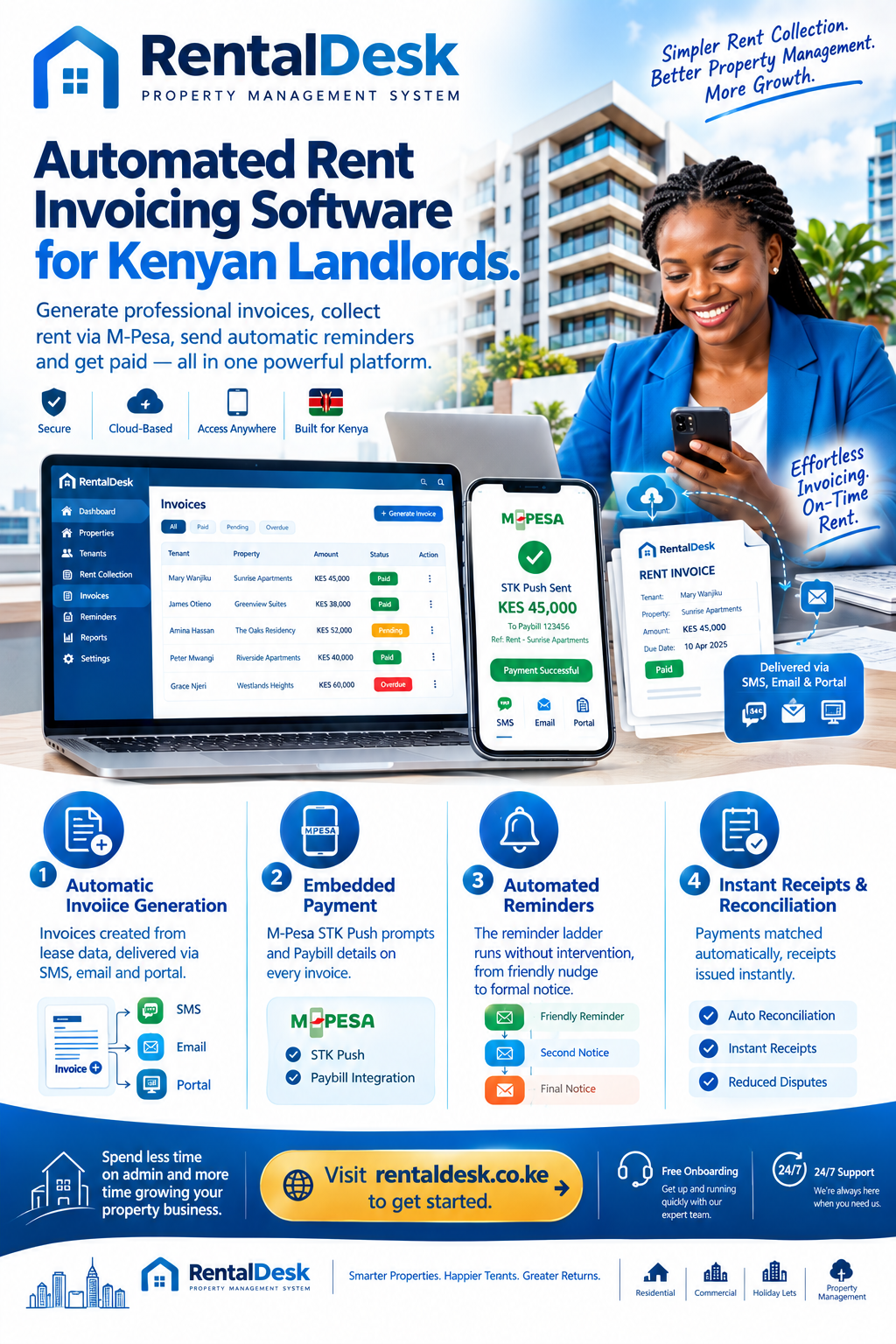
Automated rent invoicing software is the engine that turns a monthly administrative chore into a background process that runs without anyone remembering to run it. In Kenyan rental management, invoicing is where most portfolios quietly leak money. A landlord with fifty tenants who raises invoices manually spends a full working day each month on a task that produces no revenue, creates no competitive advantage, and generates errors that surface weeks later as disputes.
The invoice is not paperwork. It is the document that establishes what is owed, when it is due, and what happens if it is not paid. An invoice that arrives late, arrives wrong, or never arrives at all is a rent payment that will arrive late, arrive wrong, or never arrive at all. RentalDesk provides a complete automated rent invoicing solution built specifically for the Kenyan market, connecting billing, reminders, M-Pesa reconciliation, and reporting into one system.
Why Automated Rent Invoicing Software Matters in Kenya
The case for automated rent invoicing software in Kenya rests on a simple asymmetry. Tenants have moved to digital payments almost entirely. Over 90% of rent payments in urban Kenya now flow through M-Pesa, and mobile money has taken a commanding lead over cash for monthly expenses, rising from parity in 2021 to 68% by 2024. Yet the invoice that should precede those payments is, in most portfolios, still produced manually.
That gap creates predictable problems. An invoice raised three days after the due date tells the tenant that the due date is negotiable. An invoice with the wrong amount creates an argument that consumes more time than the invoice took to produce. An invoice that never gets sent leaves the landlord with no defensible position when the tenant claims they were never told what to pay. And a manual invoicing process cannot scale: at ten units it is manageable, at fifty it is a burden, and at two hundred it is a full-time job that nobody has budgeted for.
Automated rent invoicing software solves these problems by making the invoice a by-product of the lease record rather than a separate task. When the lease specifies the rent, the due date, and the charges, the invoice generates itself. When the payment arrives, the invoice closes itself. When the due date passes without payment, the reminder sequence begins itself. The landlord’s role shifts from producing documents to reviewing exceptions.
What Automated Rent Invoicing Software Should Actually Do
The market offers many products that claim to invoice automatically. Most of them invoice on a schedule. A much smaller number connect the invoice to the payment, the ledger, and the reminder sequence in a way that actually reduces work. The distinction matters.
A genuine automated rent invoicing software does five things. It generates invoices from the lease record, not from a separate template. It delivers them through channels the tenant actually reads. It carries a payment mechanism inside the invoice itself. It reconciles the resulting payment automatically. And it triggers the reminder ladder without human intervention.
Systems that do only the first two are invoice generators. Systems that do all five are collection systems. The difference shows up in the arrears report.
Generating Invoices from the Lease Record
The foundation of automated rent invoicing software is that the invoice is derived, not created. Every invoice should trace back to a lease, a unit, and a set of agreed charges.
That means the system must hold the lease terms as structured data: rent amount, due date, billing frequency, escalation schedule, deposit terms, and any additional recurring charges such as service charge, water, garbage, parking, or security. When those terms are recorded once, the invoice generates from them every period without further input.
RentalDesk generates recurring rent invoices for every tenant based on their billing cycle. Invoices are created on schedule, ensuring tenants receive professional billing documents without manual effort. The platform supports automatic monthly, weekly, or custom billing, along with property-specific billing cycles for portfolios with mixed tenancy types.
This matters more than it sounds. In a manual process, the invoice is a fresh document each month, and each fresh document is an opportunity to type the wrong amount. In an automated process, the invoice is a rendering of data that has already been verified. The error rate falls to near zero because there is nothing left to mistype.
Delivering Invoices Through the Right Channels
An invoice that is generated but not delivered is a record, not a bill. The automated rent invoicing software must deliver through channels the tenant actually uses.
In Kenya, that means SMS first. SMS delivery rates are high, read rates are high, and no app installation or data connection is required. Email remains relevant for commercial tenants, corporate leases, and diaspora landlords who need a PDF for their records. WhatsApp occupies a middle ground, increasingly used for invoice links and payment requests.
RentalDesk supports delivery via SMS, email, and portal notification, with invoices and receipts accessible through the tenant portal. Tenants can view invoices and payment history, download receipts, and see outstanding balances at any time without contacting the landlord.
The delivery choice is not merely aesthetic. An invoice that reaches the tenant on the 25th of the month is a different instrument from one that reaches them on the 3rd. Timing is part of the billing design, and automated rent invoicing software exists precisely to make timing reliable.
Embedding Payment Inside the Invoice
The most consequential design decision in automated rent invoicing software is whether the invoice includes a way to pay.
A traditional invoice states an amount and a Paybill number, and leaves the tenant to navigate the M-Pesa menu themselves. That works, but it introduces friction. The tenant must remember the Paybill, the account reference, and the amount. Each of those is an opportunity to make a mistake that generates a reconciliation exception.
A better invoice embeds the payment. RentalDesk supports M-Pesa STK Push, which sends a payment prompt directly to the tenant’s phone. The tenant confirms the amount and enters their PIN. The payment completes without the tenant typing a Paybill number or an account reference at all. The invoice has become the payment instrument.
This is where the line between automated rent invoicing software and a payment gateway begins to blur, and in a well-built system it should. Invoicing and collection are two halves of the same process, and separating them across two platforms reintroduces the manual reconciliation that both were designed to eliminate.
The Reminder Ladder Built Into the Invoice
An invoice that is not paid should generate its own follow-up. This is the feature that most distinguishes automated rent invoicing software from a simple billing tool.
The reminder ladder should escalate predictably. A friendly heads-up before the due date. A neutral reminder on the day. A firmer message a day or two after. A factual reminder once the word “arrears” becomes appropriate. A formal notice at a defined threshold. And an escalation flag once the account requires a human conversation rather than another automated message.
RentalDesk sends automated reminders before and after due dates. Most arrears are recovered at the first polite reminder, because most late payments are not deliberate defaults. They are forgotten payments, misaligned paydays, or simple omissions. The value of automating the ladder is that the first polite reminder always gets sent, even in a month when the landlord is overwhelmed.
Handling the Invoice Types Kenyan Landlords Actually Need
Generic invoicing software tends to assume a single recurring charge. Kenyan rental portfolios rarely work that way. A landlord managing apartments in Kilimani may invoice rent monthly, water by meter reading, garbage as a fixed charge, and parking separately. A commercial landlord may invoice rent quarterly with VAT, service charge monthly, and utility recovery on consumption.
RentalDesk handles multiple charge types within a single invoice. Service charge categories can be configured separately, utility meters can be read per unit and billed automatically, and fixed charges can be attached to specific units. This matters because the automated rent invoicing software that cannot handle a meter reading will be abandoned the first month water consumption has to be billed.
The platform also supports part-payment handling. When a tenant pays KSh 15,000 against a KSh 25,000 invoice, the payment posts against the open invoice and the balance remains visible for follow-up. This is not just an accounting nicety. A tenant who has paid part of the rent should not be treated as fully unpaid, and a tenant who has paid in full should not be chased because a partial payment was recorded incorrectly.
The Link Between Invoicing and Reconciliation
The automated rent invoicing software conversation cannot be separated from reconciliation, because an invoice creates the reference that makes reconciliation possible.
Every invoice should carry a unique reference that appears in the M-Pesa transaction when the tenant pays. When the payment arrives via Safaricom’s C2B callback, the reference is what allows the system to match the payment to the correct invoice and tenant. Without a structured invoice, the payment arrives with whatever reference the tenant typed, and matching becomes guesswork.
RentalDesk uses the invoice to carry the account reference, so when a tenant pays via M-Pesa Paybill, the system extracts the amount, phone number, account reference, and transaction ID, matches the reference to the correct tenant and unit, credits the tenant account, generates a receipt, and updates the dashboard in real-time.
This is why standardising the account reference format is the single highest-leverage action a landlord can take before implementing any invoicing system. If the invoice tells the tenant to use “KIL-A12” and the tenant types “a 12”, the reference normalisation layer must handle the variation. If the format is never standardised at all, no amount of software will reconcile reliably.
Receipts: The Other Half of the Invoice
An invoice states what is owed. A receipt confirms what was paid. Both are documents, and both should be generated automatically.
RentalDesk issues digital receipts automatically once payment is verified, sent via SMS, WhatsApp, or email. The receipt includes the transaction ID, payment date and time, amount paid, and outstanding balance. This eliminates the “I paid” versus “I didn’t receive it” disputes that consume disproportionate time in manual operations.
An automated rent invoicing software that generates invoices but leaves receipts to manual issuance has solved the easier half of the documentation problem. Tenants chase receipts more often than they chase invoices, because a receipt is their proof of payment and their protection against a disputed balance.
Automated Invoicing and KRA Compliance
The automated rent invoicing software question has acquired a compliance dimension that did not exist a few years ago. The Kenya Revenue Authority’s Monthly Rental Income regime requires landlords to file returns by the 20th of the month following rent receipt. The Electronic Rental Income Tax System (eRITS), launched in April 2025, is designed to integrate with existing rental property management systems, with future integration with Ardhisasa anticipated to support geo-referencing and data verification of rental properties.
KRA expects landlords to maintain records necessary for the determination and ascertainment of the tax. Among those records are rent registers, receipts, and lease documentation. An automated invoicing system produces all three as a by-product of normal operation.
RentalDesk generates rent collection reports, income versus expense reports, arrears ageing reports, and audit-ready financial statements from the same verified records used for daily operations. The figures that appear in a KRA return are the same figures that appear in the invoice register, which means the return can be prepared without reconstructing anything.
The Time and Cost Arithmetic
The automated rent invoicing software decision is ultimately an arithmetic question, and the arithmetic is not close.
A landlord managing thirty units who raises invoices manually spends several hours each month on generation, delivery, and the follow-up that results from late or missing invoices. Add the time spent answering tenant queries about balances, chasing payment confirmations, and reconciling M-Pesa messages against a spreadsheet, and the monthly figure climbs further. Kenyan property managers surveyed on the matter report that a significant share of their working time goes to payment reconciliation.
Automated invoicing collapses that time. The invoice generates, delivers, and reconciles without intervention. The landlord’s remaining task is reviewing exceptions, which on a well-configured system is a fifteen-minute morning routine.
Against that saving, the subscription cost of automated rent invoicing software is small. And the saving is not only time. An invoice that arrives on time improves payment behaviour. A receipt that arrives instantly reduces disputes. A ledger that reconciles automatically reduces the chance that a payment is lost, duplicated, or misallocated, any one of which can cost more than a year of subscription.
Common Implementation Mistakes
The automated rent invoicing software journey has predictable failure modes, and most of them occur before the first invoice is generated.
Migrating unclean lease data. If lease terms are inconsistent across tenancies, the invoices generated from them will be inconsistent. Standardise rent amounts, due dates, and charge structures before going live.
Failing to standardise the account reference. An invoice that tells tenants to use an unclear reference will produce unmatched payments. Decide on a format, communicate it in the lease, and repeat it in every reminder.
Skipping the pilot. Run one property or one block through a full billing cycle before rolling out. Count the manual interventions during the pilot. That number predicts your monthly workload.
Turning off reminders. Automated invoicing without automated reminders is half a system. The reminder ladder is where most of the collection improvement comes from.
Leaving the ledger disconnected. If the invoice is generated in one system and the payment recorded in another, the automation ends at the invoice. Connect invoicing and reconciliation or the manual work simply moves downstream.
How RentalDesk Delivers Automated Rent Invoicing
RentalDesk is built specifically for the Kenyan market, and automated invoicing sits at the centre of the platform.
Invoice generation from lease data. Invoices are created automatically from recorded lease terms and billing cycles, eliminating manual preparation.
Multi-channel delivery. Invoices reach tenants via SMS, email, and the tenant portal.
Embedded payment. M-Pesa STK Push prompts are delivered directly to the tenant’s phone, and Paybill details are included on every invoice.
Automated reminders. The reminder ladder runs without intervention, escalating from a friendly heads-up to a formal notice.
Automatic reconciliation. Payments are matched to the correct invoice and tenant, with a reconciliation queue for exceptions.
Instant receipts. Digital receipts are issued automatically once payment is verified.
Metered and fixed charges. Service charge, water, garbage, parking, and other charges are handled within the same invoice.
KRA-ready reporting. Rent collection reports, arrears ageing, and financial statements are generated from verified records.
Role-based access. Caretakers, managers, and accountants see only what they need to see.
How to Get Started
Implementing automated rent invoicing software is straightforward with RentalDesk .
Step 1: Sign up. Visit RentalDesk and create your account. Choose a plan that matches your portfolio size.
Step 2: Record your lease terms. Enter rent amounts, due dates, billing frequencies, and any additional recurring charges for each tenancy.
Step 3: Standardise the account reference. Decide on a format that identifies the property and the unit, and record it against each tenant.
Step 4: Configure M-Pesa collection. Connect your Paybill to RentalDesk so that payments reconcile automatically.
Step 5: Set the reminder ladder. Configure the timing and tone of reminders before and after the due date.
Step 6: Run a pilot cycle. Process one full billing period for a single property and count the manual interventions.
Step 7: Go live. Roll out to the full portfolio once the pilot validates the workflow, and review the exception queue each morning.
The Future of Automated Rent Invoicing in Kenya
The automated rent invoicing software landscape is moving in a clear direction. Standing order features allow tenants to authorise recurring payments directly from their mobile wallets. Government tax infrastructure is integrating with property management platforms. And the gap between invoicing, collection, and compliance is closing.
The landlords who adopt automated invoicing early will not simply have tidier paperwork. They will have lower arrears, faster reconciliation, better tenant relationships, and a compliance position that withstands scrutiny. The invoice is where that chain begins.
RentalDesk provides the structured platform that makes automated rent invoicing work in Kenya—not as a document generator, but as the first link in a fully reconciled financial system.