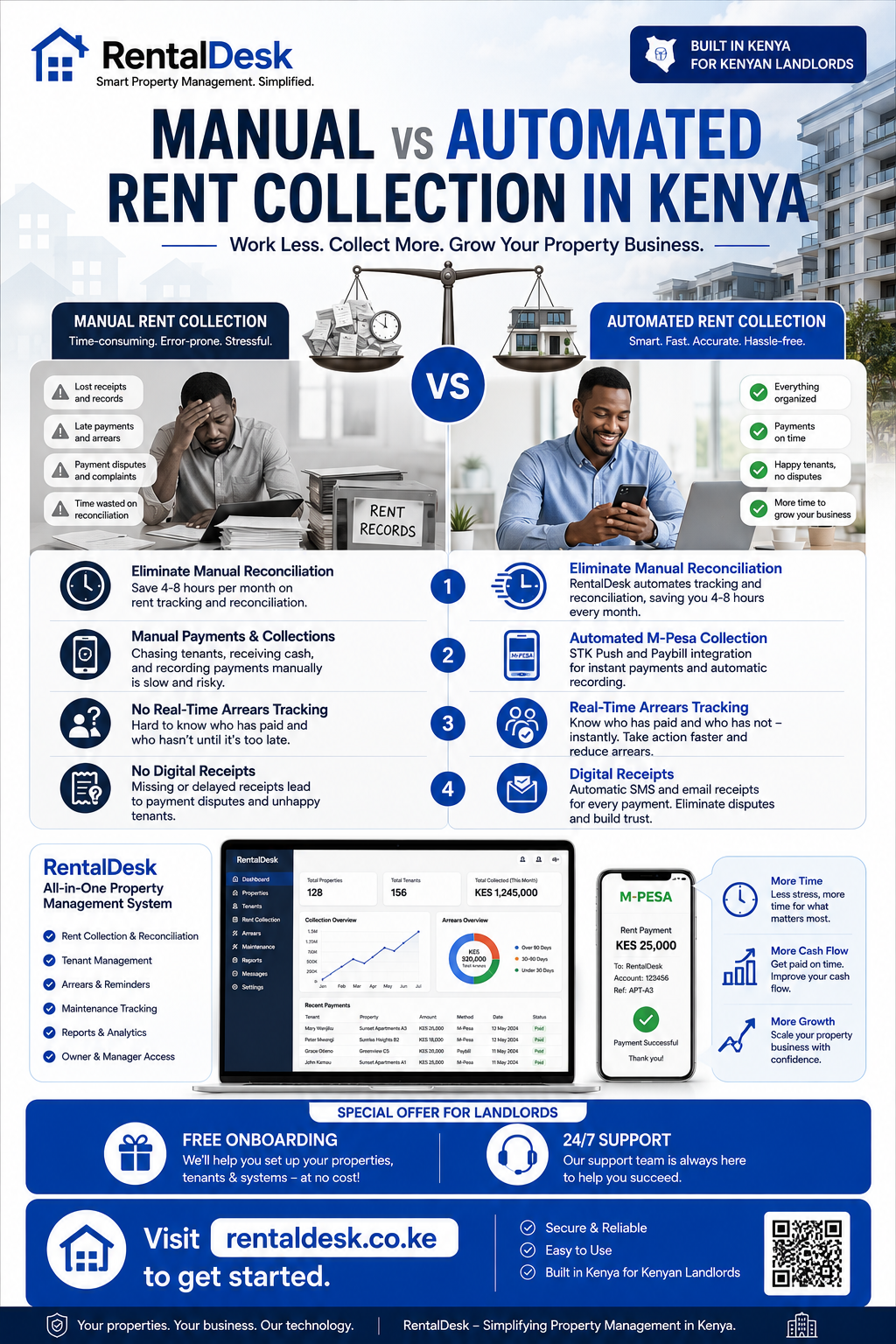
Manual vs automated rent collection in Kenya is a question every landlord and property manager must answer to run a profitable, stress-free rental business. For decades, property management in Kenya’s rental sector has operated in a low-tech, informal environment where rent has been collected manually, records are paper-based, and many landlords function more as passive recipients of income than active participants in a modern financial ecosystem . However, that model is fast becoming untenable, with today’s market expectations driven by speed, transparency, and digital convenience . RentalDesk provides the complete automated solution for Kenyan landlords ready to make the switch from manual to digital rent collection.
Why the Manual vs Automated Rent Collection in Kenya Debate Matters
The manual vs automated rent collection in Kenya conversation is essential because the way you collect rent directly impacts your cash flow, tenant relationships, and ability to scale your rental business. According to industry data, late rent payments and vacancies can cost landlords up to 30% of expected rental income . Yet despite the clear benefits of automation, a 2023-2024 Real Estate survey by the Kenya National Bureau of Statistics revealed that just about 47.2% of real estate agents in Kenya use rent collection software .
This disconnect highlights information gaps that require bridging for landlords—and their agents—to learn that digitizing rent payments has the potential to reduce arrears and streamline operations, while providing them with verifiable transaction records . RentalDesk is specifically designed to address this gap and help landlords transition from manual to automated rent collection.
Manual Rent Collection: The Traditional Approach
Understanding manual vs automated rent collection in Kenya starts with examining the traditional approach. Manual rent collection involves landlords receiving payments through M-Pesa messages, bank transfers, or cash, and then manually recording these payments against tenant accounts.
How Manual Rent Collection Works
Without a system, the typical manual rent collection process looks like this:
-
Tenant sends M-Pesa payment to landlord’s Paybill, Till, or phone number
-
Landlord receives SMS confirmation
-
Landlord checks their phone and identifies the sender
-
Landlord opens a spreadsheet or notebook to find the tenant
-
Landlord records the payment amount and date
-
Landlord calculates the remaining balance manually
-
Landlord prepares a receipt (sometimes)
-
Landlord identifies who hasn’t paid
-
Landlord sends reminders individually
For a landlord with 50 tenants receiving over 50 M-Pesa transactions every month, this process takes 4-8 hours monthly. For 200 tenants, it becomes a full-time job . This administrative burden is one of the key differences in the manual vs automated rent collection in Kenya comparison.
Common Problems with Manual Rent Collection
The manual vs automated rent collection in Kenya debate reveals several critical problems with manual approaches:
Missed or Misallocated Payments: When tenants pay via M-Pesa, some use the correct account reference, some use the wrong one, and others use no reference at all. The payment lands in an unmatched queue until someone figures out whose it is . Manual reconciliation is prone to errors where payments are applied to the wrong tenant accounts.
Unnoticed Arrears: Without automatic tracking, arrears accumulate unnoticed. A tenant can fall behind by two or three months before the landlord realizes the extent of the problem . Manual processes lack real-time visibility into overdue accounts.
Inconsistent Records: Payment confirmations are scattered across WhatsApp messages, SMS inboxes, notebooks, and spreadsheets. This fragmentation leads to lost records, duplicated entries, and confusion about who has paid and who hasn’t .
Time-Consuming Reconciliation: A landlord with 50 tenants spends 4-8 hours each month manually reconciling payments. For 200 tenants, it is a full-time job . This time could be better spent on growing the business, improving properties, and serving tenants.
Payment Disputes: Without automatic digital receipts, tenants may claim they paid when the landlord didn’t receive it, or vice versa. These disputes erode trust and damage landlord-tenant relationships .
Poor Financial Visibility: Without a system, landlords lack real-time visibility into rental income, arrears, and property performance. This makes it difficult to make informed decisions about rent adjustments, property improvements, and investment strategies.
Growth Limitations: What works for 5 units will not work for 50—and definitely not for 200+ units. Manual processes become unmanageable as portfolios grow, limiting landlords’ ability to scale their rental businesses .
Automated Rent Collection: The Modern Solution
The manual vs automated rent collection in Kenya comparison shows that automation offers a fundamentally different approach. RentalDesk provides a comprehensive automated rent collection system designed specifically for the Kenyan market.
How Automated Rent Collection Works
With RentalDesk , the automated rent collection process is streamlined and efficient:
-
Tenant receives an automatic rent invoice and reminder before the due date
-
Tenant pays via M-Pesa STK Push, Paybill, or Till
-
Safaricom sends an Instant Payment Notification (IPN) callback to the system
-
The system reads the payment details and matches the account reference to the correct tenant
-
The tenant’s balance updates instantly
-
A digital receipt is generated and sent to the tenant automatically
-
The dashboard updates in real-time
-
Arrears are flagged automatically
-
Reports are generated instantly
This end-to-end automation eliminates manual effort and ensures accuracy. The technical architecture involves the M-Pesa Daraja API sending a POST request to the system endpoint every time a payment is made, providing real-time data with no delays . The system extracts the amount, phone number, account reference, and transaction ID, matches the account reference to the tenant and unit, credits the tenant account, generates a receipt, and updates the dashboard in real-time .
Paybill vs Till for Rent Collection
A critical consideration in the manual vs automated rent collection in Kenya comparison is the payment method used. RentalDesk supports both Paybill and Till, but Paybill is generally superior for rent collection .
Paybill allows an account reference field where tenants enter their unit number. This enables automatic matching of payments to the correct tenant . When a tenant pays via Paybill, the system uses the account reference to identify the tenant and reconcile the payment instantly .
Till Number is built for retail—the customer isn’t identified because in a till transaction it usually doesn’t matter . For rent, a till means landlords must reconcile by phone number (which doesn’t work if a spouse or parent pays on behalf), by amount, or by asking the sender for a reference .
Pochi la Biashara has the same identification limitations as a Till Number—no account number field . If landlords can choose, Paybill is the best collection option for rent .
Head-to-Head Comparison: Manual vs Automated Rent Collection in Kenya
The manual vs automated rent collection in Kenya comparison reveals clear differences across multiple dimensions:
Time Efficiency
Manual: Landlords spend 4-8 hours per month reconciling payments for 50 tenants . For 200 tenants, it becomes a full-time job.
Automated: Reconciliation happens in seconds. The system matches payments instantly, reducing manual work by 70-90% . Property teams spend less time rebuilding records and more time managing the property .
Accuracy
Manual: Errors are common—payments get applied to wrong tenants, duplicates go unnoticed, partial payments are recorded incorrectly, and arrears are missed .
Automated: Payments are automatically matched to the correct tenant and invoice . The system handles partial payments by posting the partial amount and leaving the balance open . Duplicate payments are flagged rather than auto-posted .
Arrears Management
Manual: Arrears go unnoticed for months. Without automatic tracking, landlords don’t know who owes what .
Automated: Arrears are flagged immediately. Automated reports show aging analysis (30, 60, 90+ days overdue) . Tenants who haven’t paid are pinned to the top of the dashboard for quick follow-up.
Payment Disputes
Manual: “I paid” versus “I didn’t receive it” disputes are common. Without digital receipts, there is no clear record .
Automated: Digital receipts are issued instantly after payment via SMS, WhatsApp, or email . Every transaction has a clear audit trail, eliminating disputes.
Scalability
Manual: What works for 5 units will not work for 50—and definitely not for 200+ units . Manual processes become unmanageable as portfolios grow.
Automated: The system scales with the portfolio. Landlords can add new properties and tenants without increasing manual work . The system handles large transaction volumes automatically.
Financial Visibility
Manual: Landlords lack real-time visibility into rental income and arrears. Reports are created manually and are often out of date .
Automated: Real-time dashboards show total rent expected, collected, outstanding balances, occupancy percentage, and total arrears . Professional reports are generated instantly.
Tenant Experience
Manual: Tenants don’t receive digital receipts. Communication is inconsistent. Payment status is unclear .
Automated: Tenants receive instant digital receipts . Automated reminders ensure tenants never forget their rent obligations. The tenant portal provides 24/7 access to balances and payment history.
The Four Common Reconciliation Failures
The manual vs automated rent collection in Kenya comparison highlights four common failures that cost landlords the most time:
1. Wrong or Missing Account Number
Tenants type the wrong reference or skip it entirely. The payment lands in an unmatched queue until someone figures out whose it is . Manual resolution is time-consuming and error-prone.
RentalDesk solves this by providing a clear dashboard of unmatched payments. Landlords can quickly identify the tenant based on phone number, amount, and timing, and match the payment correctly.
2. Partial Payments
Tenants pay half the rent now and half on payday next week. A spreadsheet-based process either records it wrong, records it twice, or misses the second half .
RentalDesk handles this perfectly. It posts the partial amount against the open invoice and leaves the balance open. The next payment from the same tenant continues against the same invoice .
3. Duplicate Payments
Tenants pay twice—often because they didn’t get a receipt the first time and thought the payment failed .
RentalDesk detects duplicates by transaction ID and flags the issue rather than auto-posting. This prevents overpayments and reduces reconciliation work.
4. Unclear Payment Allocation
Without a system, it’s unclear which month or invoice a payment applies to. This is especially problematic when tenants have arrears from previous months .
RentalDesk automatically allocates payments to the correct invoice and month, maintaining clear records for every tenant.
Why RentalDesk Is the Best Automated Rent Collection Solution
RentalDesk stands out as the premier solution in the manual vs automated rent collection in Kenya comparison for several reasons:
Built for the Kenyan Market
RentalDesk is specifically designed for Kenyan rental operations, with M-Pesa integration, KES currency support, local tax compliance, and workflows tailored to Kenyan landlord-tenant relationships . Unlike generic global software, RentalDesk understands the Kenyan rental market.
Comprehensive M-Pesa Integration
RentalDesk supports M-Pesa STK Push, Paybill, and Till options, providing flexible payment channels for tenants . The system uses Safaricom’s Daraja API with IPN callbacks for real-time payment capture . This ensures instant reconciliation and accurate records.
Real-Time Payment Tracking
RentalDesk provides real-time visibility into rent collections, arrears, and tenant balances . Landlords can see exactly who has paid, who hasn’t, and what remains outstanding at any moment.
Automated Receipts and Communication
RentalDesk automatically generates digital receipts sent via SMS, WhatsApp, or email immediately after payment . Automated reminders ensure tenants never forget their rent obligations.
Comprehensive Reporting
RentalDesk generates professional reports including rent collection summaries, arrears aging reports, property income statements, and tenant statements . These reports are essential for tax compliance, owner reporting, and informed decision-making.
Scalable for All Portfolio Sizes
RentalDesk supports landlords and property managers of all sizes, from individual landlords with a few units to large property management companies with hundreds of properties . The system scales with your growth.
Secure and Reliable
RentalDesk is cloud-based with secure data storage, regular backups, and role-based access controls . This ensures your data is protected and accessible from anywhere.
How to Transition from Manual to Automated Rent Collection
Making the switch from manual to automated rent collection with RentalDesk is straightforward:
Step 1: Sign Up for RentalDesk
Visit RentalDesk and create your account. Choose a plan that matches your portfolio size and requirements.
Step 2: Set Up Your Property Portfolio
Add your properties, units, and tenants to the system. RentalDesk makes it easy to organize your properties the way you already manage them.
Step 3: Configure Payment Collection
Set up M-Pesa Paybill or STK Push for rent collection. RentalDesk provides step-by-step guidance for this process.
Step 4: Activate Automated Invoicing and Reminders
Configure rent invoices and automated reminders. RentalDesk automatically generates invoices and sends reminders to tenants before the due date.
Step 5: Start Collecting Rent Automatically
Once configured, RentalDesk automatically reconciles payments, updates tenant balances, and generates reports in real time. The manual reconciliation work is eliminated.
Step 6: Monitor and Optimize
Use RentalDesk dashboards and reports to monitor performance, identify trends, and optimize your rental operations.
- Manual vs automated rent collection in Kenya
- Manual vs automated rent collection in Kenya
- Manual vs automated rent collection in Kenya
- Manual vs automated rent collection in Kenya
- Manual vs automated rent collection in Kenya
- Manual vs automated rent collection in Kenya
- Manual vs automated rent collection in Kenya
- Manual vs automated rent collection in Kenya
- Manual vs automated rent collection in Kenya
- Manual vs automated rent collection in Kenya