
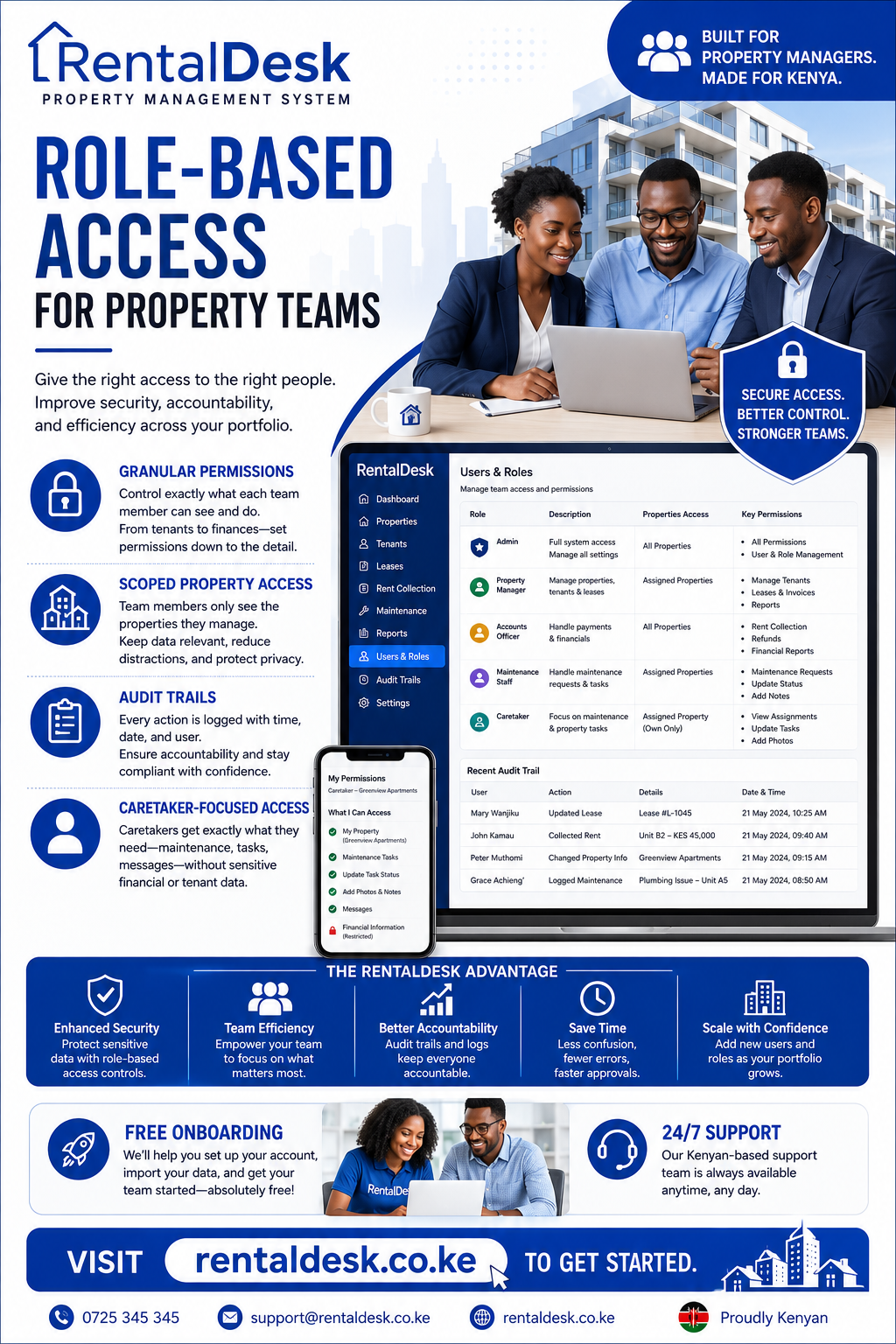
Role-based access for property teams is a critical component of modern property management in Kenya. As rental portfolios grow from a few units to dozens or hundreds, the number of people involved in property operations expands significantly. Landlords, property managers, accountants, caretakers, agents, and tenants all need different levels of access to the system. Without proper role-based access controls, sensitive financial data may be exposed to unauthorized users, staff may accidentally modify critical records, and accountability becomes nearly impossible to maintain. RentalDesk provides comprehensive role-based access control that ensures each team member sees only what they need to see and can only perform actions appropriate to their role.
Why Role-Based Access for Property Teams Matters
The role-based access for property teams conversation is essential because rental management is increasingly a team effort. A property management company in Nairobi may have owners, finance staff, operations personnel, agents, and caretakers all working on the same portfolio. Each of these roles has different information needs and different levels of authority.
Without role-based access, several problems emerge. A caretaker might accidentally see sensitive financial reports meant only for the property owner. A finance staff member might modify tenant records they should only view. An agent might access data from properties they do not manage. These issues compromise security, reduce accountability, and create confusion about who is responsible for what.
The role-based access for property teams approach solves these problems by restricting modules and actions by role and capability. Each person works within an assigned role while management retains visibility and a complete audit trail. This structure makes good management repeatable and scalable.
A strong process should assign duties and permissions for each property role. RentalDesk supports this by providing a central dashboard where authorized users can review the same current records. That consistency matters when a landlord, agent, accountant, and caretaker are involved in one portfolio. Each person can work within an assigned role while management retains visibility and an audit trail.
Understanding Role-Based Access Control
The role-based access for property teams framework involves several key components. RentalDesk supports role restrictions, scoped property access, module access, capabilities, and tenant-host controls for safer team operations.
What This Feature Does
RentalDesk’s role-based access control:
-
Supports business owner, finance, operations, landlord, tenant, agent, and admin-style access patterns
-
Restricts modules and actions by role and capability
-
Scopes property access for selected team members
-
Keeps tenant, landlord, and internal views separated
Why It Helps Landlords
The role-based access for property teams approach delivers several benefits:
-
Reduces accidental access to sensitive data: Team members cannot see information they do not need for their work
-
Supports delegation without losing control: Managers can assign tasks and responsibilities while maintaining oversight
-
Improves accountability for larger teams: Every action is tracked to a specific user and role
How It Works in RentalDesk
RentalDesk implements role-based access for property teams through a straightforward process:
-
Assign users to the correct role
-
Configure capabilities and property scope where needed
-
RentalDesk applies access controls before showing records
-
Admins adjust permissions as teams change
Key Roles in Property Management
The role-based access for property teams approach recognizes that different people need different levels of access. RentalDesk supports a range of roles tailored to the Kenyan property management context.
Property Owner / Landlord
The landlord or property owner needs full visibility into property performance but may not need to perform day-to-day operations. In RentalDesk, owners can track revenue, view arrears, download reports, approve expenses, and monitor maintenance progress. They can see financial summaries and property-level performance without being bogged down in operational details.
For diaspora landlords, role-based access is particularly valuable. The owner can have an oversight account while a local manager handles daily operations. The owner sees reports and key metrics while the manager handles tenants, maintenance, and payments.
Property Manager
The property manager needs operational access to run the property day-to-day. This includes managing tenants, tracking rent collections, assigning maintenance requests, and generating reports for owners. In RentalDesk, property managers can:
-
View all properties and units in their portfolio
-
Track rent collections and arrears
-
Assign maintenance tasks to caretakers and contractors
-
Generate financial reports
-
Communicate with tenants
Property managers can handle bigger portfolios and provide better reports to owners when they have the right system permissions. With role-based access for property teams, the manager has the tools they need without access to sensitive information like other owners’ financial data.
Finance Staff / Accountant
The finance role needs access to financial data but may not need operational details. In RentalDesk, finance staff can:
-
View and reconcile payments
-
Generate financial reports
-
Track expenses and maintenance costs
-
Prepare KRA-compliant reports
-
Manage invoices and receipts
Access to tenant records and maintenance details can be restricted so finance staff focus on the numbers without being distracted by operational tasks.
Caretaker
Caretakers are the backbone of property operations in Kenya. They handle rent collection, maintenance, tenant communication, and property inspections. The role-based access for property teams ensures caretakers have exactly what they need without access to sensitive financial information.
In RentalDesk, caretakers can see:
-
Unit occupancy status
-
Rent paid/unpaid status
-
Open repairs and maintenance issues
-
Current vacancies
-
Tenant contact information
-
Viewing schedules
They cannot see deposit balances, owner statements, KRA filings, lease documents, or other properties outside their assigned scope. This focused access reduces the risk of errors and protects sensitive information.
Agents
Agents involved in leasing and tenant placement need access to vacancy information and tenant records but do not need financial data. RentalDesk allows agents to view available units, manage tenant applications, and communicate with prospects without accessing rent collection or financial reports.
Tenants
Tenants have their own portal with self-service capabilities. They can:
-
View and download invoices
-
Access payment history
-
See outstanding balances
-
Submit maintenance requests
-
Download receipts
This self-service capability reduces inquiries and empowers tenants to manage their accounts independently. The tenant view is completely separate from internal views, protecting landlord and property management data.
Scoped Property Access
The role-based access for property teams approach includes scoped property access, which means team members only see the properties they are authorized to manage. This is particularly important for property management companies handling portfolios for multiple owners.
A property manager handling buildings in Kilimani should not see data for properties in Mombasa managed by a colleague. Scoped property access ensures that each team member works only within their assigned properties, reducing the risk of data breaches and improving accountability.
For property management firms, this capability is essential. The firm can have multiple managers each with access to their own portfolio, while senior management retains oversight across all properties. This structure allows the firm to scale without compromising security.
Module-Level Access Control
The role-based access for property teams approach includes module-level access control, which means different users can access different modules within the system. For example:
-
Finance staff access the accounting and reporting modules
-
Operations staff access the tenant and maintenance modules
-
Agents access the vacancy and leasing modules
-
Caretakers access the rent collection and maintenance modules
This granular control ensures that each user sees only the modules relevant to their work, reducing clutter and improving efficiency.
Capabilities and Permissions
The role-based access for property teams approach includes capabilities and permissions, which define what actions a user can perform within a module. For example:
-
Some users can create and edit tenant records
-
Some users can only view records
-
Some users can approve expenses
-
Some users can only suggest expenses for approval
This granularity ensures that users have exactly the permissions they need to do their job and no more.
Managing Access for Growing Teams
The role-based access for property teams approach must scale with the organization. RentalDesk supports unlimited users, managers, caretakers, and accountants. As the portfolio grows, new team members can be added with appropriate permissions.
The system’s flexibility means that a property management company can start with a small team and expand without changing systems. New roles can be created, and existing roles can be modified as responsibilities change.
Caretaker Accountability Through Access Control
The role-based access for property teams approach is particularly important for managing caretakers. In practical Kenyan rental management, owners cannot see whether tenant follow-up happened, cash and payment information may be reported late, and maintenance jobs lack clear ownership and completion evidence.
RentalDesk addresses these challenges by defining duties and permissions for each caretaker role. Caretakers have clear visibility into assigned tasks with due dates and visible status. They can log interactions and payment exceptions consistently, and they must provide evidence for inspections, repairs, and approved expenses.
The expected result is less dependence on verbal updates, faster escalation of tenant and maintenance issues, and more reliable owner reporting.
Audit Trails and Accountability
The role-based access for property teams approach includes comprehensive audit trails. Every action taken by every user is logged with timestamp and user identification. This means managers can see who modified a record, approved an expense, or updated a tenant account.
Audit trails serve multiple purposes. They provide accountability when something goes wrong. They help identify training needs when users make mistakes. They support compliance with internal policies and external regulations. And they help resolve disputes by providing a clear record of what happened and who was responsible.
Best Practices for Implementing Role-Based Access
The role-based access for property teams approach should be implemented thoughtfully. Here are best practices for Kenyan property teams:
Define Roles Clearly
Before configuring the system, define exactly what each role should be able to see and do. Document these definitions so everyone understands their responsibilities.
Start with a Clean Data Foundation
Clean data is more important than rushing the launch. Unit numbers, tenant names, phone contacts, and balances should be checked before the system becomes the main working tool.
Assign Responsibility Clearly
One person may manage resident records, another may handle payments, and another may coordinate maintenance requests. This avoids confusion and improves accountability.
Use the Reports
Use system reports during team meetings. When the team relies on system reports, staff become more consistent with data entry and management gains more confidence in the process.
Review and Adjust
After the first month, review what users are struggling with, which reports are useful, and which workflows need adjustment. Roles and permissions should evolve as the organization grows and changes.
Handle Team Member Departures
When a team member leaves, remove access promptly, assign open tasks, verify keys and documents, communicate appropriately with tenants, review payment exceptions, and conduct a formal balance handover.
The RentalDesk Advantage
RentalDesk stands out as a premier solution for role-based access for property teams for several reasons:
Built for the Kenyan Market
RentalDesk is designed around Kenyan rental workflows, including rent tracking, tenant management, arrears, reports, maintenance, and remote landlord visibility. The platform supports M-Pesa integration, Kenyan Shilling reporting, and local property management practices.
Comprehensive Role Options
RentalDesk supports business owner, finance, operations, landlord, tenant, agent, and admin-style access patterns. This comprehensive role set covers the full range of property team members.
Scalable for All Portfolio Sizes
Whether you manage one property or hundreds, RentalDesk scales with you. The platform supports unlimited properties, units, caretakers, tenants, managers, and accountants.
Affordable Pricing
RentalDesk offers flexible plans suitable for landlords of all portfolio sizes, from individual landlords to large property management companies.
Dedicated Support
RentalDesk provides free onboarding and support, ensuring property teams can get started quickly and receive help when needed.
Frequently Asked Questions
Q1: What is role-based access for property teams?
Role-based access for property teams is a system that controls what different team members can see and do within a property management platform. RentalDesk provides comprehensive role-based access with role restrictions, scoped property access, and module-level controls.
Q2: Can the owner and manager have different access?
Yes, they should have access appropriate to their responsibilities. Confirm the roles and permissions currently available, use separate accounts, and restrict sensitive functions. Platform permissions should reflect organizational authority.
Q3: How does RentalDesk handle caretaker access?
RentalDesk gives caretakers access to unit occupancy status, rent status, open repairs, vacancies, and tenant contact information. They cannot see deposit balances, owner statements, KRA filings, or other sensitive data.
Q4: Can different team members see different properties?
Yes. RentalDesk supports scoped property access, so team members only see the properties they are authorized to manage.
Q5: What if a team member leaves?
Remove access promptly, assign open tasks, verify keys and documents, communicate appropriately with tenants, review payment exceptions, and conduct a formal balance handover. Shared system records can support continuity, but the owner must manage the transition.